
More than three years after our initial reports, we revisited the iOS data flow restriction bypasses on iOS 27.0.1. While Apple has closed at least one of the previously demonstrated paths, the fundamental problem remains: data can still cross the managed/unmanaged boundary using built-in iOS functionality.
In 2023, we reported several ways to circumvent Apple’s Managed Open In and Managed Pasteboard restrictions. These MDM controls are intended to separate corporate and personal data on managed iOS devices. In our previous article, No Patch, no Trust: Consequences of iOS Data Flow Restriction Bypasses for Enterprises, we discussed the consequences of these bypasses for enterprise deployments.
The previously demonstrated bypasses included the preinstalled Shortcuts app, Quick Look, and two additional issues involving the Files app. At the time, Apple responded to our reports by stating:
“MDM profiles provide configuration management but do not establish additional security boundaries beyond what iOS and iPadOS have to offer.”
Nevertheless, Apple continues to describe these MDM mechanisms as tools for protecting corporate data and separating managed from unmanaged environments.
Retest with iOS 27.0.1
We have now repeated our tests on an iPhone 16e running iOS 27.0.1, configured with the same data flow restrictions as in our previous tests:
allowOpenFromManagedToUnmanaged = false
allowOpenFromUnmanagedToManaged = false
requireManagedPasteboard = true
The result is mixed, but not reassuring:
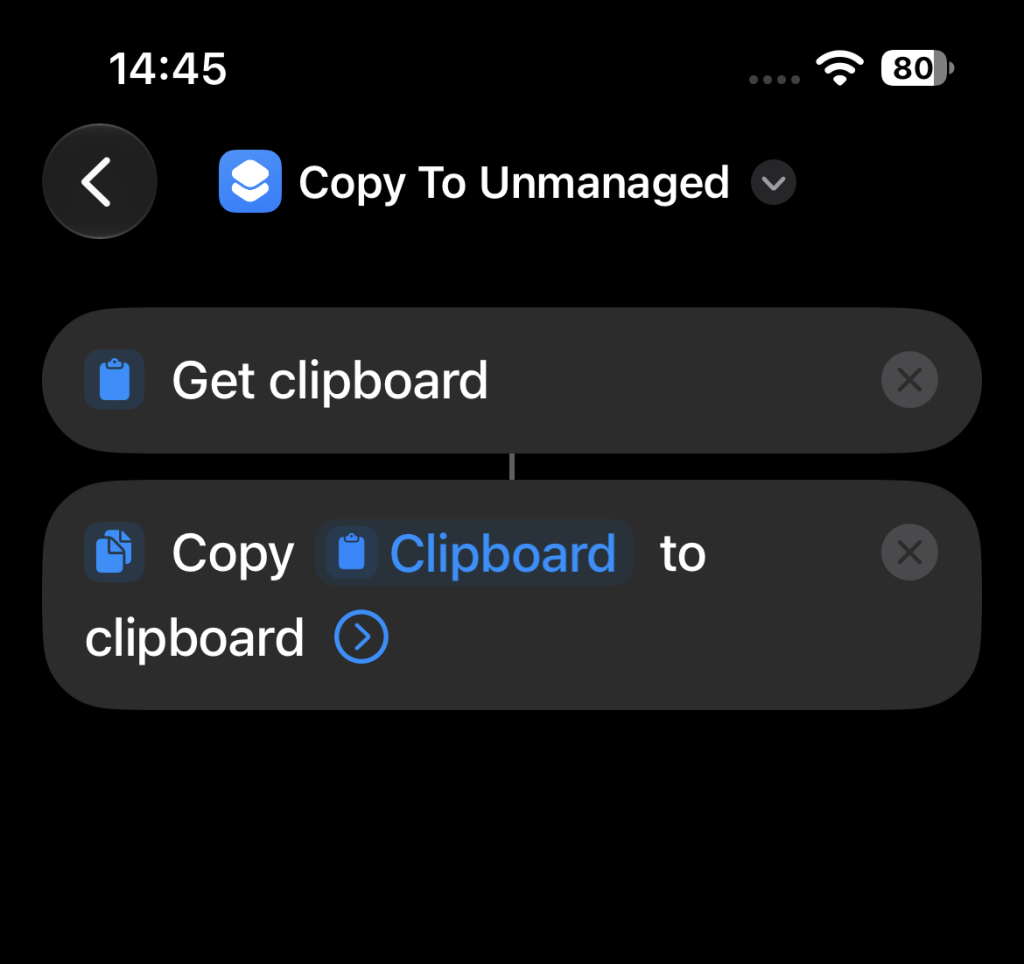
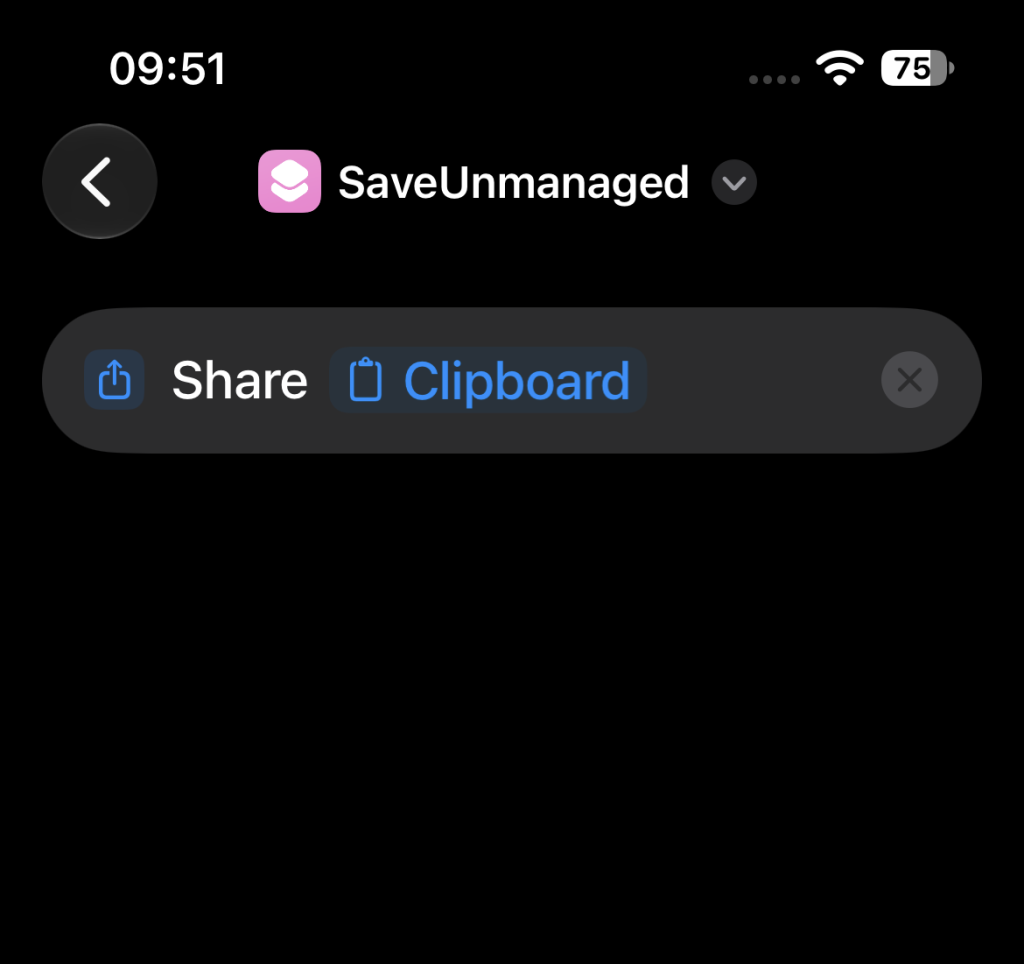
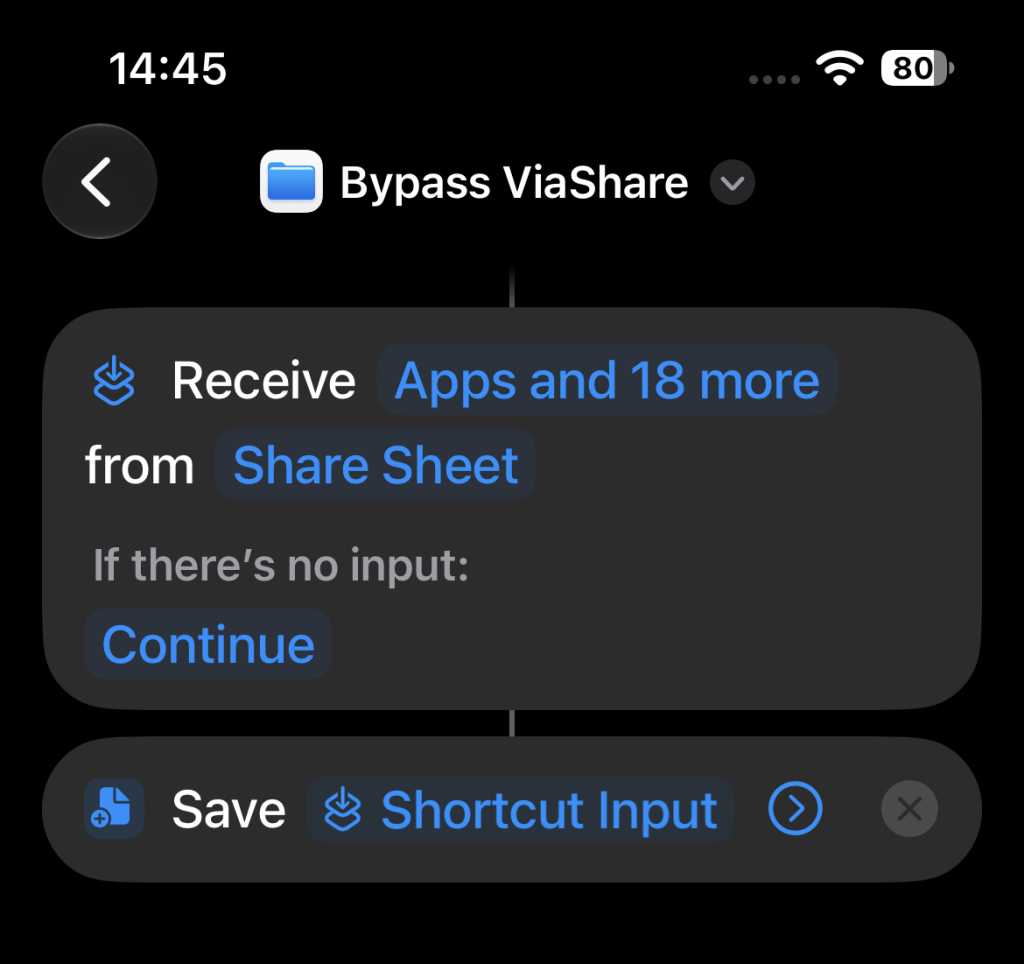
- Managed → unmanaged: A user can still use the preinstalled Shortcuts app to bypass the restrictions. Content originating from the managed side can be transferred to the unmanaged side using the clipboard and a simple shortcut. This works for simple text but also for files. (See screenshot examples)
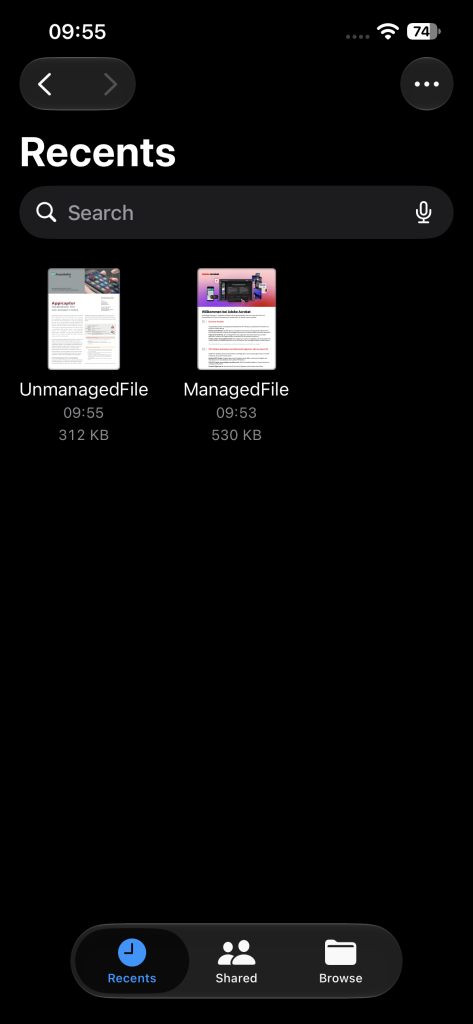
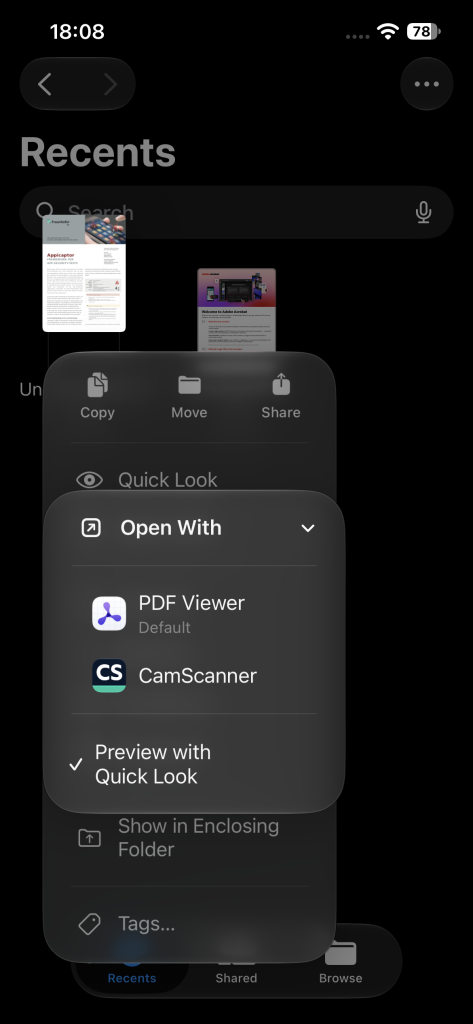
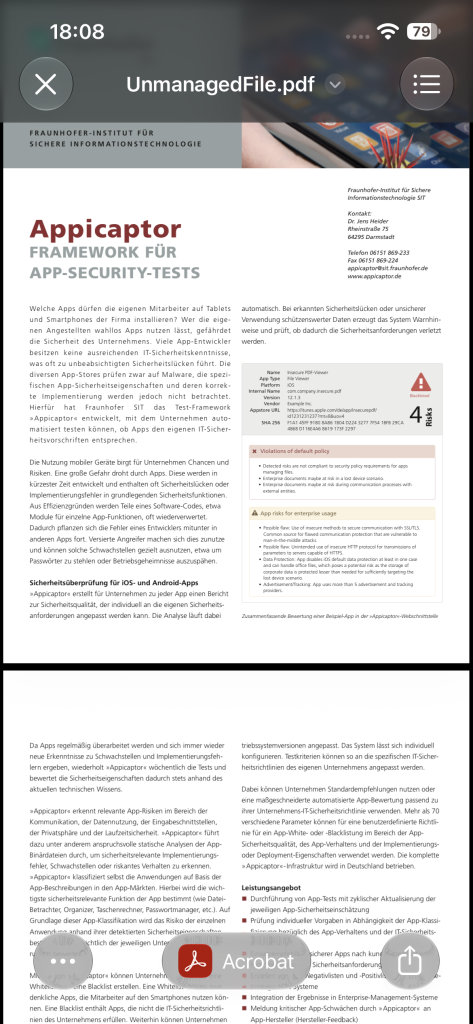
- Unmanaged → managed: For the opposite direction, the user can still use the Quick Look functionality of iOS, when a managed and an unmanaged file is present in the recents tab of the iOS file app. This is the case, when the files were viewed recently with their managed and unmanaged viewer apps, respectively. When checking the unmanaged file, the UI only provides unmanaged app in the “Open With” action. In the shown example this is the “PDF viewer” app. But when the user instead uses the “Quick Look” option, the user can choose the managed viewer app (on the bottom of the new view) to open the unmanaged file in the managed viewer app. This is “Acrobat” in the shown example.
- Our previously demonstrated delete-and-copy bypass using the Files app is no longer effective. In our tests the option to paste a document into a folder is not provided, if the document would cross the managed/unmanaged border.
The last point indicates that Apple has changed some of the affected functionality since our previous tests. However, the actual security objective, reliably enforcing the managed/unmanaged data-flow boundary, is still not achieved.
Apple’s Intended Data Flow Restrictions
This result is particularly relevant when compared with Apple’s own description of these mechanisms. In its current Managing Devices and Corporate Data document (April 2022, accessed October 28, 2026), Apple describes Managed Open In as three separate functions designed to protect corporate data. Regarding data flowing from managed to unmanaged destinations, Apple states:
“Allow documents from managed sources in unmanaged destinations. Enforcing this restriction helps prevent an organization’s managed sources and accounts from opening documents in a user’s personal destinations.”
Apple also gives the explicit example:
“This restriction could prevent a confidential email attachment in your organization’s managed mail account from being opened in any of the user’s personal apps.”
More specifically, Apple states:
“When the restrictions above are enforced, pasting of content is designed to respect the Managed Open In boundary between third-party or Apple apps like Calendar, Files, Mail, and Notes.”
Finally, Apple explicitly summarizes the intended separation:
“On the most basic level, these three functions help divide the managed device into two environments: one for managed corporate apps and data and one for unmanaged personal apps and data.”
Our results on iOS 27.0.1 show that this intended separation can still be bypassed in both directions using built-in iOS functionality, as shown in the original proof-of-concept video.
Built-in Functionality Still Crosses the Boundary
The remaining bypasses are particularly problematic because they do not depend on obscure third-party applications. iOS deeply integrates Shortcuts app and provides access to the system clipboard. In our tests, this functionality still allows data to cross the configured boundary from managed to unmanaged. In the opposite direction, a user can still use Quick Look to transfer data from unmanaged to managed.
Quick Look-related bypasses are also not a new problem. As already referenced in our 2023 article, SySS GmbH reported an MDM restriction bypass involving Quick Look in 2020 and demonstrated the issue in a proof-of-concept video.
Still No Effective Mitigation
The situation has therefore improved in one respect: the previously demonstrated delete-and-copy technique in the Files app appears to have been closed, as the option to paste a deleted managed file to an unmanaged folder is not available anymore. However, this does not solve the fundamental problem.
Due to the deep integration of Shortcuts and Quick Look into iOS, there is no effective technical mitigation in our tested configuration that reliably enforces the intended data-flow boundary while retaining this system functionality.
A short-term solution could be to delete the iOS Shortcuts app from the devices and block the installation with the MDM blacklist via the bundle ID “com.apple.shortcuts” or to exclude devices with installed Shortcuts app from the domain as non-compliant, depending on the provided functionality of the MDM solution used.
Since iOS27 Apple provides a “Denied App” functionality with the “App settings declarative configuration for Apple devices”. However, our tested Omnissa Workspace ONE UEM (AirWatch) MDM version (26.7.1829.6 (2607)) did not enforce this configuration. The MDM log indicates that the phone rejected the configuration payload. Workspace ONE UEM may have generated the configuration data incorrectly, as we can only provide the bundle ID for this configuration entry. Workspace ONE UEM then generates content for this MDM setting that is rejected by the iPhone.
However, blocking requires a bundle ID. In contrast to the Shortcuts app, Quick Look is an integral part of iOS for previewing and interacting with content. It is not a store app with a bundle ID. Therefore, administrators cannot mitigate the Quick Look bypass with the “Denied App” MDM feature.
Conclusion
The conclusion therefore remains essentially unchanged from our 2023 assessment:
Enterprises should not consider Managed Open In and Managed Pasteboard a reliable security boundary for preventing data transfer between managed and unmanaged apps.
Some individual bypass techniques may disappear over time. But as long as built-in iOS functionality still permits data to cross this boundary in both directions, the fundamental security problem remains.
Additional Consideration for COPE Environments
Organizations using Corporate-Owned, Personally Enabled (COPE) devices should also be aware that the managed/unmanaged data flow issue is not the only challenge when trying to maintain a strict separation between corporate and personal data on iOS.
As we have discussed in our previous article,“Security Implications of Apple ID Switching and Keychain Merging in COPE Mobile Environments”, Apple ID switching and Keychain merging can create an additional path through which the intended separation of corporate and personal information may be weakened.
Enterprises with COPE deployments should therefore be aware of both issues when assessing to what extent iOS can technically enforce the intended separation between corporate and personal data.