Still No Trust: iOS Data Flow Restrictions Remain Bypassable in iOS 27.0.1

More than three years after our initial reports, we revisited the iOS data flow restriction bypasses on iOS 27.0.1. While Apple has closed at least one of the previously demonstrated paths, the fundamental problem remains: data can still cross the managed/unmanaged boundary using built-in iOS functionality.

In 2023, we reported several ways to circumvent Apple’s Managed Open In and Managed Pasteboard restrictions. These MDM controls are intended to separate corporate and personal data on managed iOS devices. In our previous article, No Patch, no Trust: Consequences of iOS Data Flow Restriction Bypasses for Enterprises, we discussed the consequences of these bypasses for enterprise deployments.

The previously demonstrated bypasses included the preinstalled Shortcuts app, Quick Look, and two additional issues involving the Files app. At the time, Apple responded to our reports by stating:

“MDM profiles provide configuration management but do not establish additional security boundaries beyond what iOS and iPadOS have to offer.”

Nevertheless, Apple continues to describe these MDM mechanisms as tools for protecting corporate data and separating managed from unmanaged environments.

Retest with iOS 27.0.1

We have now repeated our tests on an iPhone 16e running iOS 27.0.1, configured with the same data flow restrictions as in our previous tests:

allowOpenFromManagedToUnmanaged = false
allowOpenFromUnmanagedToManaged = false
requireManagedPasteboard = true

The result is mixed, but not reassuring:

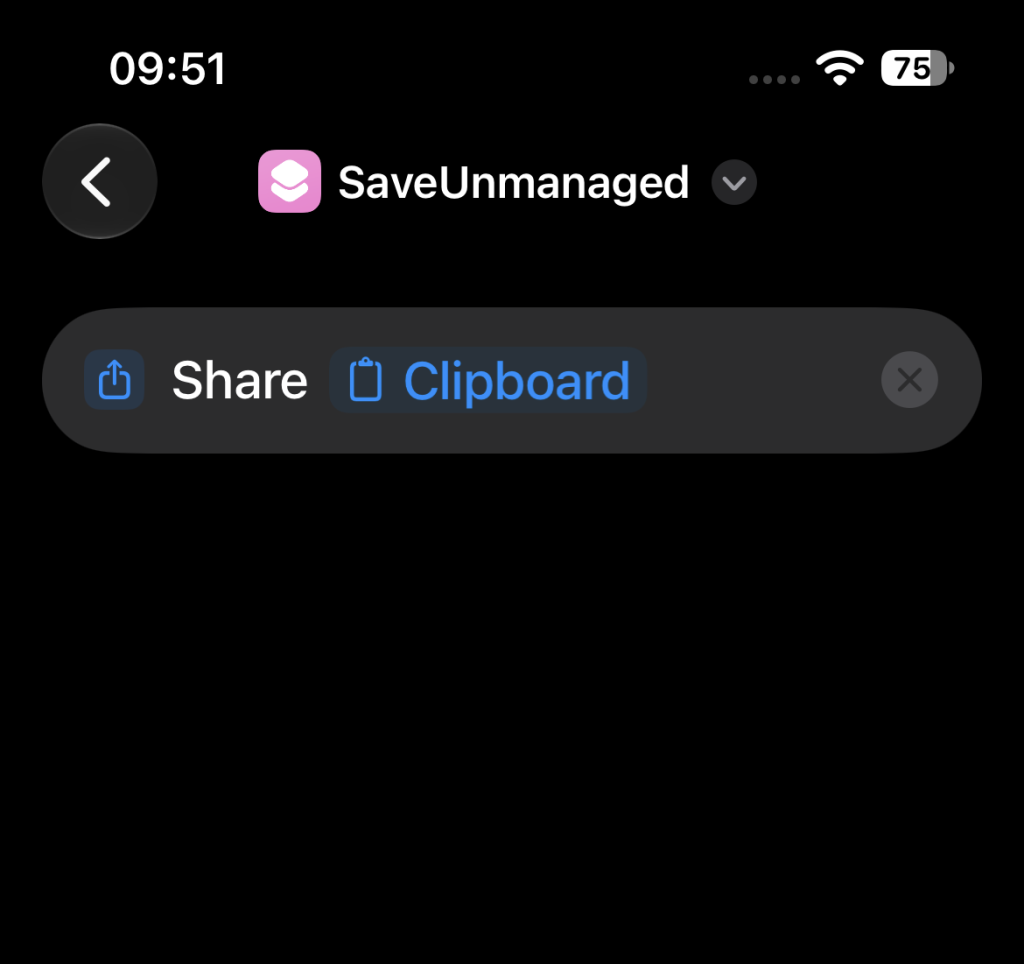
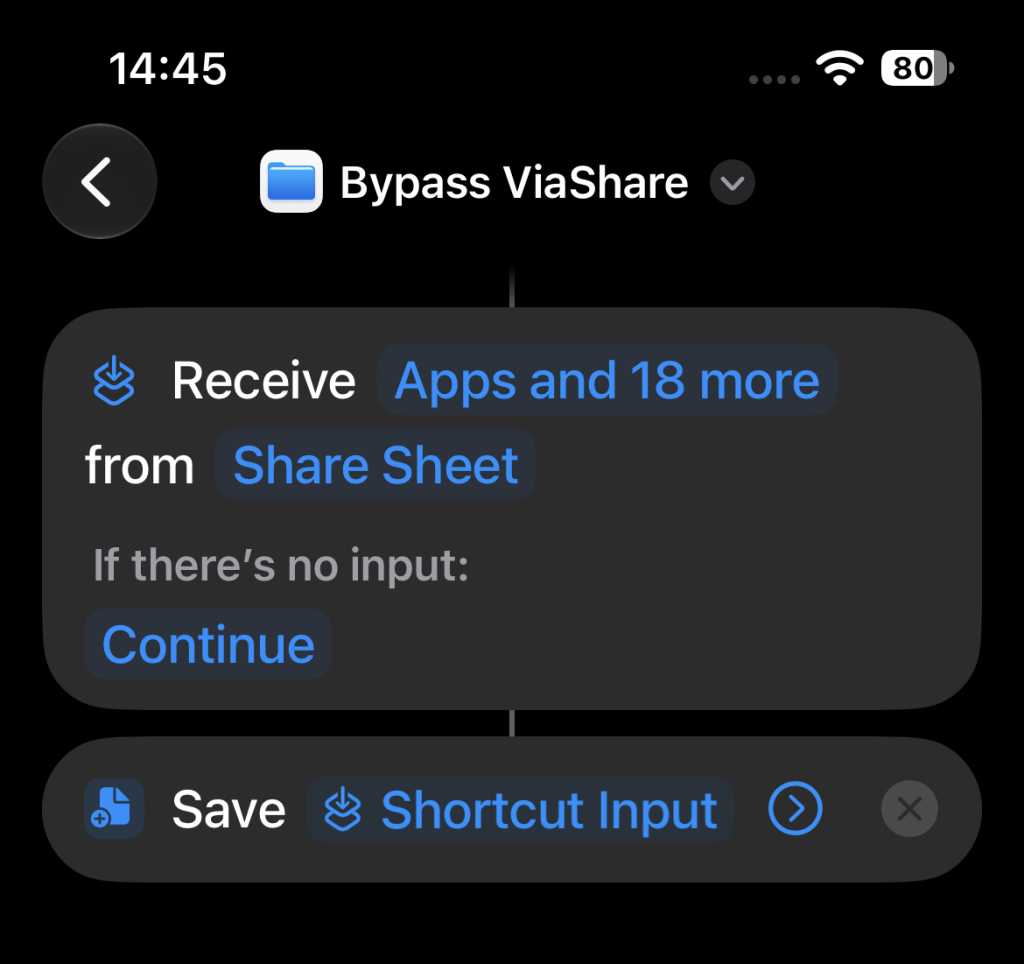
  • Managed → unmanaged: A user can still use the preinstalled Shortcuts app to bypass the restrictions. Content originating from the managed side can be transferred to the unmanaged side using the clipboard and a simple shortcut. This works for simple text but also for files. (See screenshot examples)
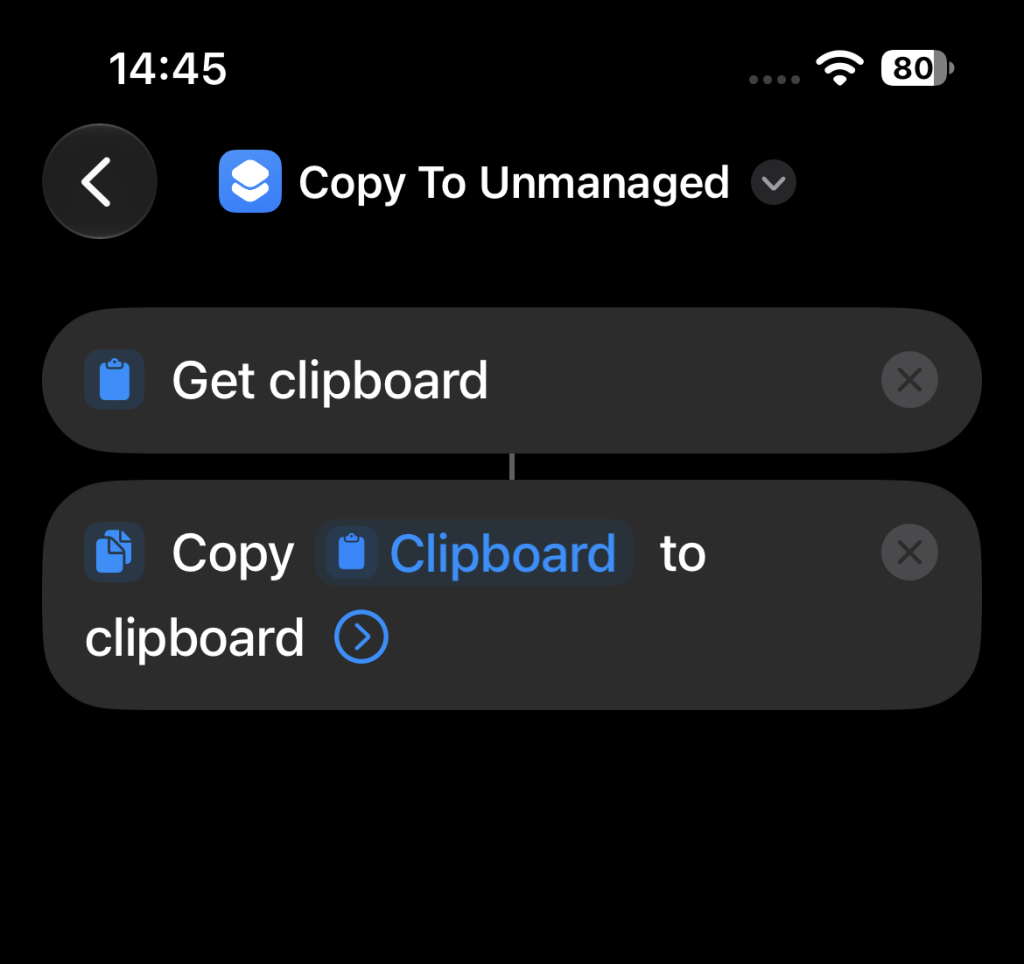
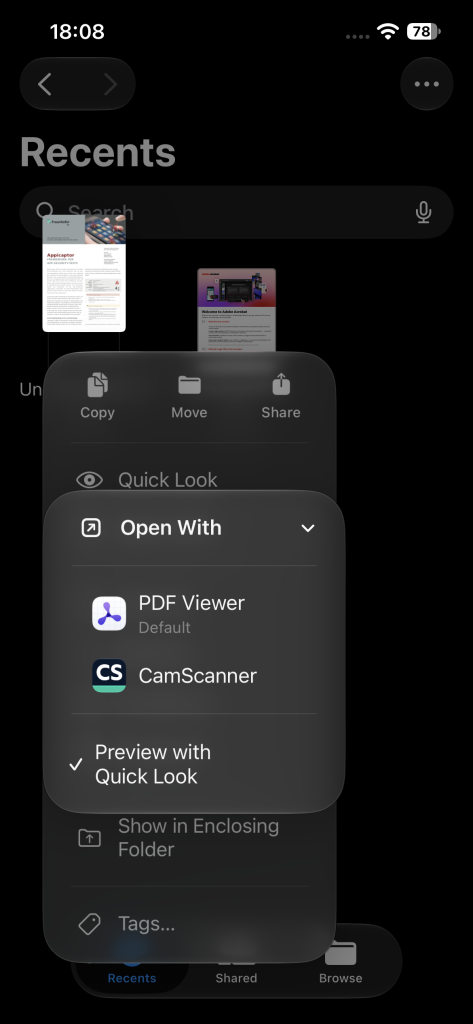
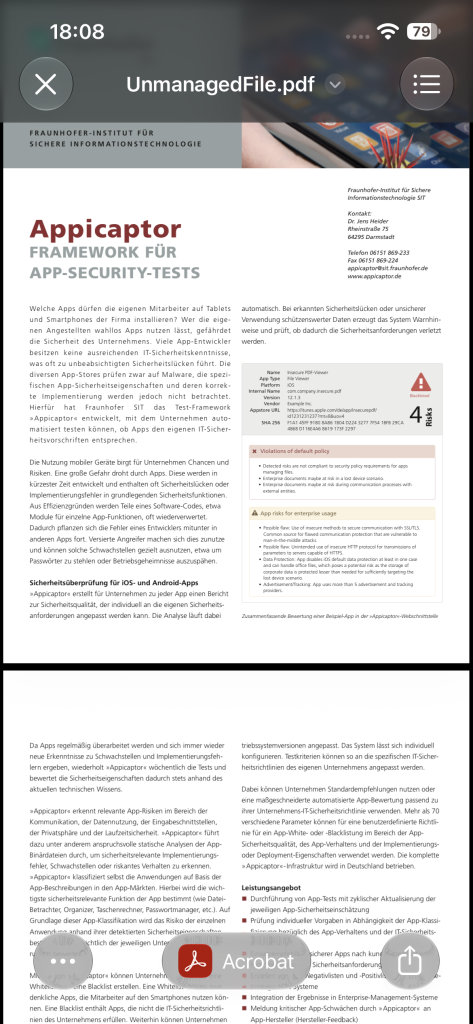
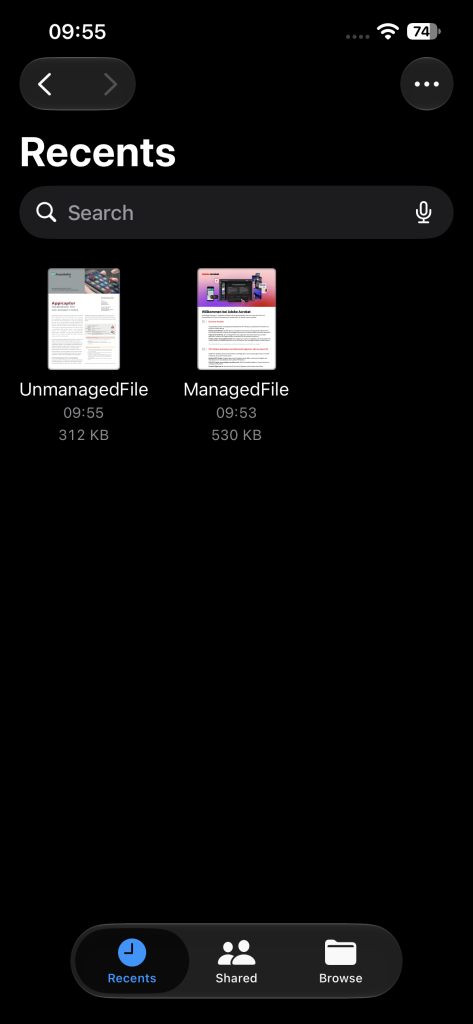
  • Unmanaged → managed: For the opposite direction, the user can still use the Quick Look functionality of iOS, when a managed and an unmanaged file is present in the recents tab of the iOS file app. This is the case, when the files were viewed recently with their managed and unmanaged viewer apps, respectively. When checking the unmanaged file, the UI only provides unmanaged app in the “Open With” action. In the shown example this is the “PDF viewer” app. But when the user instead uses the “Quick Look” option, the user can choose the managed viewer app (on the bottom of the new view) to open the unmanaged file in the managed viewer app. This is “Acrobat” in the shown example.
  • Our previously demonstrated delete-and-copy bypass using the Files app is no longer effective. In our tests the option to paste a document into a folder is not provided, if the document would cross the managed/unmanaged border.

The last point indicates that Apple has changed some of the affected functionality since our previous tests. However, the actual security objective, reliably enforcing the managed/unmanaged data-flow boundary, is still not achieved.

Apple’s Intended Data Flow Restrictions

This result is particularly relevant when compared with Apple’s own description of these mechanisms. In its current Managing Devices and Corporate Data document (April 2022, accessed October 28, 2026), Apple describes Managed Open In as three separate functions designed to protect corporate data. Regarding data flowing from managed to unmanaged destinations, Apple states:

“Allow documents from managed sources in unmanaged destinations. Enforcing this restriction helps prevent an organization’s managed sources and accounts from opening documents in a user’s personal destinations.”

Apple also gives the explicit example:

“This restriction could prevent a confidential email attachment in your organization’s managed mail account from being opened in any of the user’s personal apps.”

More specifically, Apple states:

“When the restrictions above are enforced, pasting of content is designed to respect the Managed Open In boundary between third-party or Apple apps like Calendar, Files, Mail, and Notes.”

Finally, Apple explicitly summarizes the intended separation:

“On the most basic level, these three functions help divide the managed device into two environments: one for managed corporate apps and data and one for unmanaged personal apps and data.”

Our results on iOS 27.0.1 show that this intended separation can still be bypassed in both directions using built-in iOS functionality, as shown in the original proof-of-concept video.

Built-in Functionality Still Crosses the Boundary

The remaining bypasses are particularly problematic because they do not depend on obscure third-party applications. iOS deeply integrates Shortcuts app and provides access to the system clipboard. In our tests, this functionality still allows data to cross the configured boundary from managed to unmanaged. In the opposite direction, a user can still use Quick Look to transfer data from unmanaged to managed.

Quick Look-related bypasses are also not a new problem. As already referenced in our 2023 article, SySS GmbH reported an MDM restriction bypass involving Quick Look in 2020 and demonstrated the issue in a proof-of-concept video.

Still No Effective Mitigation

The situation has therefore improved in one respect: the previously demonstrated delete-and-copy technique in the Files app appears to have been closed, as the option to paste a deleted managed file to an unmanaged folder is not available anymore. However, this does not solve the fundamental problem.

Due to the deep integration of Shortcuts and Quick Look into iOS, there is no effective technical mitigation in our tested configuration that reliably enforces the intended data-flow boundary while retaining this system functionality.

A short-term solution could be to delete the iOS Shortcuts app from the devices and block the installation with the MDM blacklist via the bundle ID “com.apple.shortcuts” or to exclude devices with installed Shortcuts app from the domain as non-compliant, depending on the provided functionality of the MDM solution used.

Since iOS27 Apple provides a “Denied App” functionality with the “App settings declarative configuration for Apple devices”. However, our tested Omnissa Workspace ONE UEM (AirWatch) MDM version (26.7.1829.6 (2607)) did not enforce this configuration. The MDM log indicates that the phone rejected the configuration payload. Workspace ONE UEM may have generated the configuration data incorrectly, as we can only provide the bundle ID for this configuration entry. Workspace ONE UEM then generates content for this MDM setting that is rejected by the iPhone.

However, blocking requires a bundle ID. In contrast to the Shortcuts app, Quick Look is an integral part of iOS for previewing and interacting with content. It is not a store app with a bundle ID. Therefore, administrators cannot mitigate the Quick Look bypass with the “Denied App” MDM feature.

Conclusion

The conclusion therefore remains essentially unchanged from our 2023 assessment:

Enterprises should not consider Managed Open In and Managed Pasteboard a reliable security boundary for preventing data transfer between managed and unmanaged apps.

Some individual bypass techniques may disappear over time. But as long as built-in iOS functionality still permits data to cross this boundary in both directions, the fundamental security problem remains.

Additional Consideration for COPE Environments

Organizations using Corporate-Owned, Personally Enabled (COPE) devices should also be aware that the managed/unmanaged data flow issue is not the only challenge when trying to maintain a strict separation between corporate and personal data on iOS.

As we have discussed in our previous article,“Security Implications of Apple ID Switching and Keychain Merging in COPE Mobile Environments”, Apple ID switching and Keychain merging can create an additional path through which the intended separation of corporate and personal information may be weakened.

Enterprises with COPE deployments should therefore be aware of both issues when assessing to what extent iOS can technically enforce the intended separation between corporate and personal data.
Security Implications of Apple ID Switching and Keychain Merging in COPE Mobile Environments

The ability to switch Apple IDs on iOS devices poses a security risk for Corporate-Owned, Personally Enabled (COPE) mobile environments. When users opt to retain Keychain entries while transitioning from a corporate Apple ID to a private Apple ID, it results in the merging of passwords to the private Apple ID. This merging poses a significant challenge for organizations that need to maintain strict control over corporate credentials, as enterprise passwords can then be synced with all private devices using the private Apple ID.

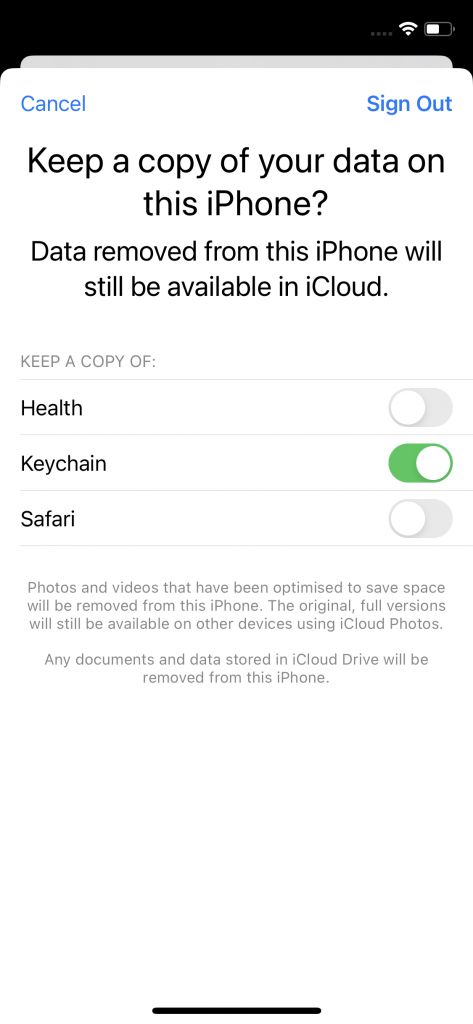
Switching Apple IDs on an iOS device involves opening the “Settings” app on an iOS device, navigate to the Apple ID section and opt to sign out of the current Apple ID. This prompts a confirmation step, asking users if they wish to keep a copy of their data on the device or to delete it. This decision is crucial to consider because if the user opts to keep the Keychain data to be stored on the device, this decision will have implications for the passwords associated with the Apple ID currently signing out. Following the sign-out, users can proceed to sign in with the new Apple ID. Once the necessary information is entered and the setup is complete, the iOS device becomes associated with the new Apple ID. The device syncs with the new account, applying apps, data, and settings associated with the updated Apple ID. However, apps installed with the previous Apple ID are still usable.

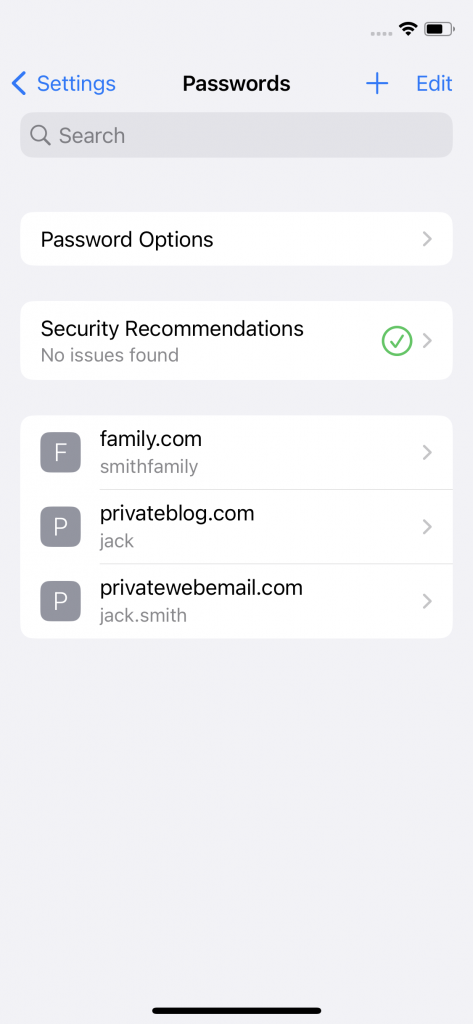
Saved passwords of personal Apple ID
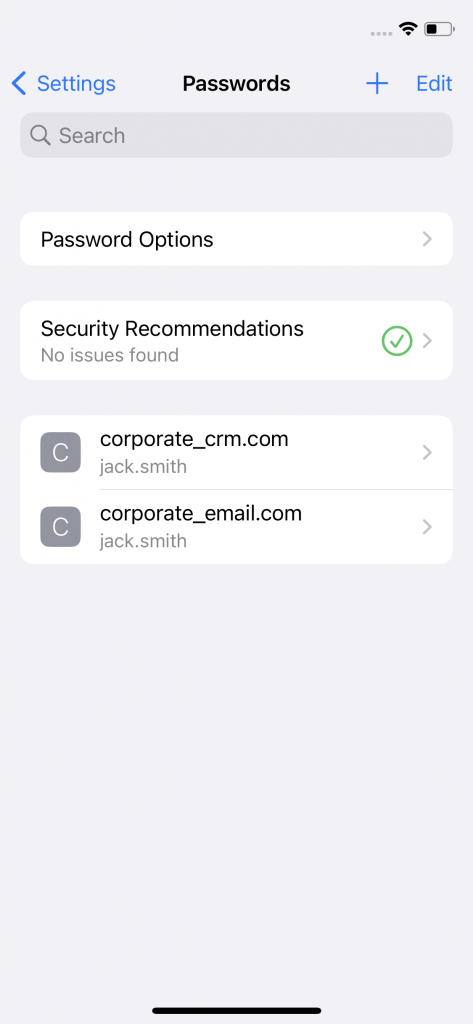
Saved passwords of corporate Apple ID

Keychain Merging and Its Effects

When logging into a website using Safari, a pop-up typically appears, asking if the user likes to store the password for AutoFill. This method simplifies the process of adding accounts to the password store. Alternatively, when creating a new account, users receive an automatically generated strong password. In either case, users can add accounts and passwords in the password store. The passwords are stored in the Keychain. If the user chooses to keep the Keychain data stored on the device during the Apple ID switching, this results in a merging of the stored passwords of the former and the latter configured Apple ID on the device.

COPE environments prioritize the separation of work and personal data, but the Keychain merging while switching Apple IDs on iOS devices undermines this separation. This has to be considered in situations where employees use their personal Apple IDs alongside corporate profiles on the same device. If one Apple ID during the Apple ID switching process is the corporate ID and the other is the private ID, that leads to merging of corporate and personal credentials compromising the security posture of COPE mobile environments and/or the privacy of the user’s private credentials.

Data retention dialogue when signing out from one Apple ID: When the "Keychain" option is selected in the dialogue whilst signing out from corporate Apple ID and before signing in to the personal Apple ID, stored corporate passwords are merged with stored personal passwords.
Data retention dialogue when signing out from one Apple ID: When the “Keychain” option is selected in the dialogue whilst signing out from corporate Apple ID and before signing in to the personal Apple ID, stored corporate passwords are merged with stored personal passwords.
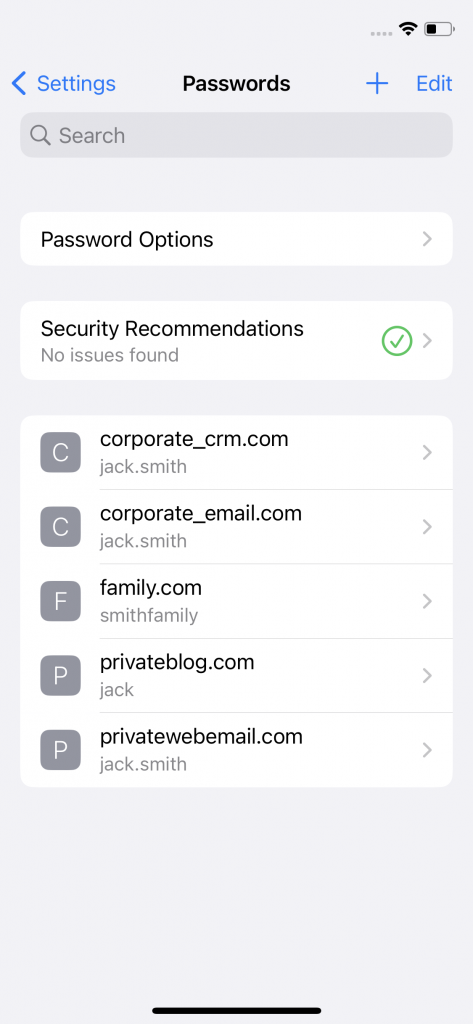
Corporate passwords from signed out corporate Apple ID are merged to saved passwords of personal Apple ID. All shown passwords are available in personal Apple ID.

Lack of Mitigation Through MDM Restrictions

Currently, there is an absence of Mobile Device Management restrictions to mitigate the unintended consequences of password merging during Apple ID switching. The inability to prevent Keychain merging in COPE environments can have a significant impact for organizations. The only measure is to enforce employee education and awareness regarding the risks associated with Apple ID switching and Keychain merging. Training programs should emphasize the importance of choosing secure options during account transitions and the potential impact on corporate and private data security.

Conclusion

The merging of Keychain entries during Apple ID switching on iOS devices poses a significant security challenge, particularly in COPE mobile environments. Organizations currently need to be proactive in addressing this issue through employee education and awareness programs. Collaboration between organizations, MDM providers and Apple, is needed to develop comprehensive solutions that safeguard corporate credentials and mitigate the risks associated with Apple ID switching.

No Patch, no Trust: Consequences of iOS Data Flow Restriction Bypasses for Enterprises

A large, sliced apple stands upright in a grassy field with a winding path leading through its hollow core, creating a tunnel-like effect. The surreal scene opens to a bright, circular light at the end of the path under a clear blue sky.

The number of ways to bypass iOS data flow restrictions meanwhile has further increased, but Apple still does not bother to fix them. So, the question is: How trustworthy are iOS MDM restrictions if even simple tricks to bypass them are not closed by Apple?

In many enterprises, there is the need to separate data of different origins or trust levels. In COPE (company owned, personally enabled) deployments this typically is the separation between private and business apps. Whereas in COBO (company owned, business only) deployments often data of supporting tools (such as travel management) should be separated from confidential enterprise data or other data with higher protection requirements.

Apple acknowledges this demand of controlling the data flow, “to keep it protected from both attacks and user missteps” by applying the Mobile Device Management (MDM) settings “Managed Open In” and “Managed pasteboard”. However, we have already demonstrated that it is possible to circumvent these MDM restrictions with the pre-installed iOS Shortcuts App. Others also reported issues already in 2020 with the possibility to use the “Quick Look” functionality of the native iOS email client for a bypass, also demonstrated in a video.

New Findings

The recently new discovered and reported issues are related to the iOS Files app. The first issue is related to the “Recents” Tab of the Files app. When a user had opened any document in a managed app before and now open an unmanaged document in the “Recents” tab of the Files app, the share action incorrectly presents a list of managed apps instead of unmanaged apps. The opposite direction for the bypass (managed to unmanaged app) is the second newly reported issue. Deleting a managed document with the Files app and copying it to an unmanaged app folder (instead of restoring it) removes the MDM restriction and permits the user to open the document in the unmanaged app. This is also shown in our extended demonstration video, now demonstrating five unfixed issues with the iOS data flow restrictions.

Reactions to Reported Issues

We again reported the two new issues to Apple, but also this time, Apple argued that “MDM profiles provide configuration management but do not establish additional security boundaries beyond what iOS and iPadOS have to offer.” A similar argument was also given for the reported MDM restriction bypass of SySS GmbH.

For all these six bypass issues, there are currently no mitigations available. Taking all the current conversations with Apple into account, and as reported issues of 2020 are still not fixed, there seems to be no justifiable reason to believe that our findings will be fixed sooner.

Consequences for Enterprises

MDM restrictions are a vital instrument for securing the usage of iOS devices in enterprise environments. Only thanks to these restrictions, the requirements of enterprises can be fulfilled for a device that is primarily developed for the consumer market. Even with effective MDM restrictions it is still a challenging task for enterprises to keep up with constantly changed and extended features of mobile smartphone operating systems. And often enough, MDM restrictions that would make new features acceptable for enterprises are released only major versions later, if any (e.g., still no possibility to prevent a mix-up of private and enterprise passwords when switching between private and enterprise Apple IDs in COPE deployments, discussed in an upcoming article).

Experiencing the lack of support for fixing multiple reported issues in advertised security features now raises the question: Which other MDM restrictions are insecure? When one follows Apple’s argument, for any other bypass of such MDM restrictions a patch will be rejected and probably already have been rejected before, as MDM restrictions are always just configuration options per definition. This isn’t then only a technical issue, it becomes an issue of trust in supporting enterprises with reliable solutions.

In consequence, the missing patches reduce the possibilities for a secure iOS enterprise deployment in COPE and COBO scenarios.

Trivial Bypass of iOS MDM Restrictions Apple doesn’t fix

Apple promotes MDM restrictions that should prevent data flows between managed and unmanaged apps. These restrictions can be bypassed easily and effortlessly using an app that is pre-installed on every new iOS device: the Shortcuts App. This is a finding of our practical tests on iOS 17.1 that should concern all enterprises that rely on these restrictions to use iOS devices in a compliant way with their enterprise policy for personal enabled usage.

Update: Problem is not only related to iOS Shortcuts App. MDM Restrictions can also be bypass with iOS Files App and iOS E-Mail client.

Apple promotes the data flow control between managed and unmanaged apps as a solution for data separation between personal and corporate data, “to keep it protected from both attacks and user missteps“. To achieve this protection, many enterprises configure the following Mobile Device Management (MDM) restrictions for the managed iOS devices:

Managed pasteboard. In iOS 15 and iPadOS 15 or later, this restriction helps control the pasting of content between managed and unmanaged destinations. When the restrictions above are enforced, pasting of content is designed to respect the Managed Open In boundary between third-party or Apple apps like Calendar, Files, Mail, and Notes. And with this restriction, apps can’t request items from the pasteboard when the content crosses the managed boundary.

Allow documents from managed sources in unmanaged destinations. Enforcing this restriction helps prevent an organization’s managed sources and accounts from opening documents in a user’s personal destinations. This restriction could prevent a confidential email attachment in your organization’s managed mail account from being opened in any of the user’s personal apps.

(see Apple Document “Managing Devices and Corporate Data”, accessed October 9th, 2023)

With the first restriction, a user should not be able to paste the content of the pasteboard to an unmanaged app, if the content was copied from a managed app, or vice versa. The second restriction applies the same restriction to documents. And in our tests, iOS prevented us from performing such actions, after the MDM restrictions for the test devices have been activated.

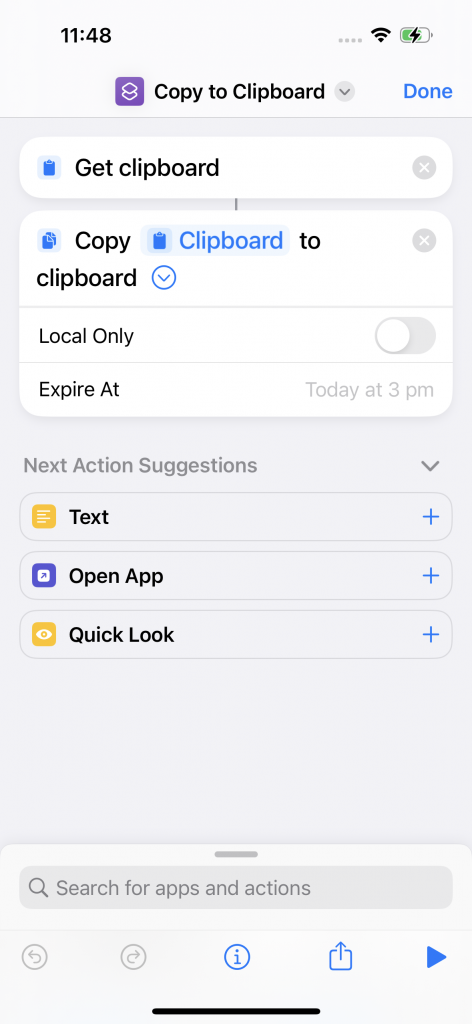
However, the iOS Shortcuts App, which is an integral part since iOS 13 and can be used to automate almost any task on iOS, can be abused to bypass such restrictions. The first shortcut (below on the left side) simply reads the clipboard and copies the content back to the global clipboard, which is then also synced with all other devices that the user has logged in with the same Apple account. When the user activates this shortcut, it strips of the information, that the original content was copied from a managed app and so iOS does no longer prevent the paste action to an unmanaged app. Each shortcut can also be combined with a trigger action that can automated the execution of it. So, the bypass of iOS MDM Restrictions can also be automated.

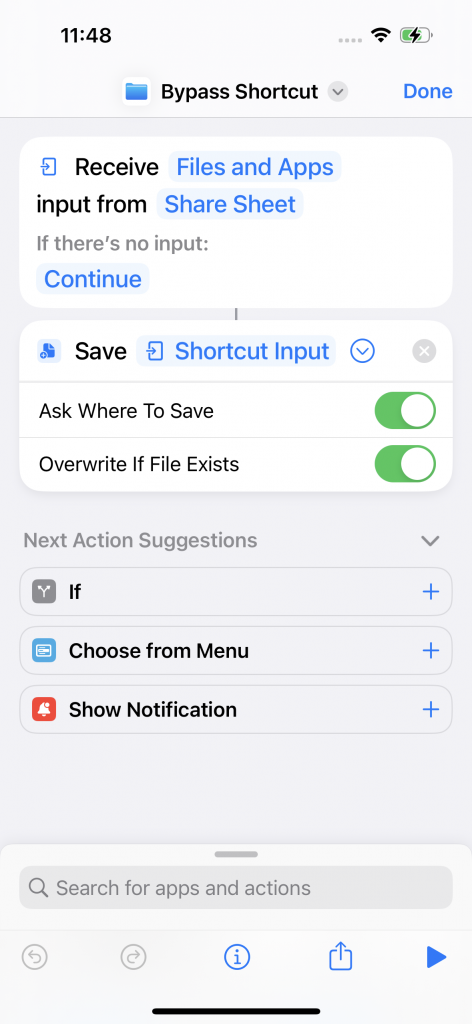
The second example shortcut uses the input of the share sheet to save the content of a document from a managed app. When using this shortcut in the share sheet, iOS prompts for name and location of the file and stores it without the information, that the content originated from a managed app. This way the document can be opened also from unmanaged apps. We created a video for both bypass methods to show the environment and the results in action. But these are only simple examples of the problem. There are many more possibilities to use actions of the Shortcuts App to bypass the iOS MDM restrictions.

Apparently, the Shortcuts App has privileges to access any data from managed apps, although it is not configured as a managed app through the MDM profile. This way the app can access the data, but when the data is saved by the Shortcuts App, it is saved as an unmanaged app. The fix therefore should be to keep the origin information of the content the Shortcuts app processes. This way the app could still access content from managed apps, but the processed content would be marked as originated from a managed app and this way the data separation would be kept intact.

We reported this flaw via Apple’s responsible disclosure process. However, the issue was rejected. We provided a detailed description, screenshots and videos, but also on a second try, where we explained again that the bypass circumvents an advertised security feature of iOS, it was not accepted. We also reached out to Apple via feedbackassistant.apple.com, but did not receive any answer in 2 months. As the current Shortcuts App version 6.1.2 is still vulnerable, we decided to publish the findings to warn enterprises that they cannot rely on iOS data flow restrictions.

A short-term solution would be to delete the iOS Shortcuts App from the devices and block the installation with the MDM blacklist via the bundle ID “com.apple.shortcuts” or to exclude devices with installed Shortcuts App from the domain as non-compliant, depending on the provided functionality of the MDM solution used. However, in the VMware Workspace ONE UEM (AirWatch) MDM tested, the Shortcuts App blacklisting did not prevent the installation nor was the device marked as non-compliant.

Without a proper blocking of the Shortcuts App, company data can currently be sent unintentionally in unmanaged apps through manually used or automated shortcuts and thus leave the company in an uncontrolled manner.

You can visit us on it-sa Expo&Congress, 10. – 12. October in Hall 6, Booth 210 for further details.