How Android’s Installed App List Protection Fails in Practice

Android 11 introduced a protection for the installed apps list through a permission, treating it as sensitive personal data. In theory, any app wanting that information must request a special, tightly controlled permission. In practice, this post shows that a simple manifest trick allows apps to bypass those protections entirely and list almost all installed apps without asking the user, and without triggering Google Play’s review process. An analysis of the top 2,000 Google Play apps reveals that over 24.1% of apps already use this loophole. This post explains how the bypass works, how common it is, and why it is relevant for privacy and app security.

Why the list of your apps is so sensitive

Smartphones store a huge amount of personal data, but it is not only your files and messages that are revealing. Knowing which apps are installed on your device already exposes a lot: your bank and insurance providers, health and fitness apps, dating apps, religious or political apps, shopping habits, and hobbies. Advertising and tracking companies have long used this “installed app list” as a form of personally identifiable information (PII). Especially the app list alone enables identifying: age (typical app target groups), gender (period tracker), ethnicity (bible app), living area (public transport app), personal interest (cooking recipes app), financial situation (banking/trading apps), commuting habits (petrol price tracker, airline app), used appliances (coffee machine, vacuum robot) and many more.

Google has responded to this by locking down access to PII such as IMEI, MAC address and stable device IDs. With Android 11, they added another piece: restricting access to the list of installed apps via the QUERY_ALL_PACKAGES permission. On paper, this looks like a strong privacy improvement. The work summarized here shows that, because of a design loophole, it is far less effective than it appears.

What Android tried to fix with package visibility

Before Android 11, any app could ask the system’s Package Manager for a full list of installed applications. That made personalized advertisement and profiling. With Android 11, Google introduced “package visibility filtering”. By default, an app can now see only a limited app set.

If apps really need to see all other installed apps, they should request the QUERY_ALL_PACKAGES permission. This permission is marked as high‑risk by Google. Apps that request it must justify the use and undergo manual review before being accepted on Google Play. The promise is clear: only a few justified apps should be able to see your full app list.

At the same time, Android still needs apps to communicate with each other. For example, a photo app must be able to find apps that can share or edit a picture. A file manager must find apps that can open PDFs. For this, developers declare “queries” in the app’s manifest that describe which types of other apps they want to see. This is usually based on intent actions such as “apps that can view PDFs”. This mechanism is meant to be narrow enough to support specific use cases without exposing everything.

The loophole: full app visibility without permission

The core finding is that the query system allows a manifest configuration that circumvents the protection for the installed apps list. By adding a specific intent query to the manifest, an app can list all apps that have a MAIN action. Almost every user‑facing app that appears in the launcher exposes this standard android.intent.action.MAIN action. Specifically, this query matches practically all apps a user has installed with just the following snippet in the manifest:

<queries>
    <intent>
        <action android:name="android.intent.action.MAIN" />
    </intent>
</queries>

Thus, an app gains access to information about almost all installed apps, without requesting QUERY_ALL_PACKAGES permission at all.

We built a test app in two versions: one with the permission QUERY_ALL_PACKAGES, and one using this bypass query. On a real device, the version with the permission could see 696 apps, and the one with the bypass could see 606. The missing 90 apps were mainly low‑level system components without a launchable activity. Every user‑installed app that was visible with the permission was also visible via the bypass. Functionally, the supposedly protected data is still accessible without any permission.

How widespread is the installed apps permission bypass in real Android apps?

To understand how common this pattern is, we integrated an according analysis functionality into Appicaptor.

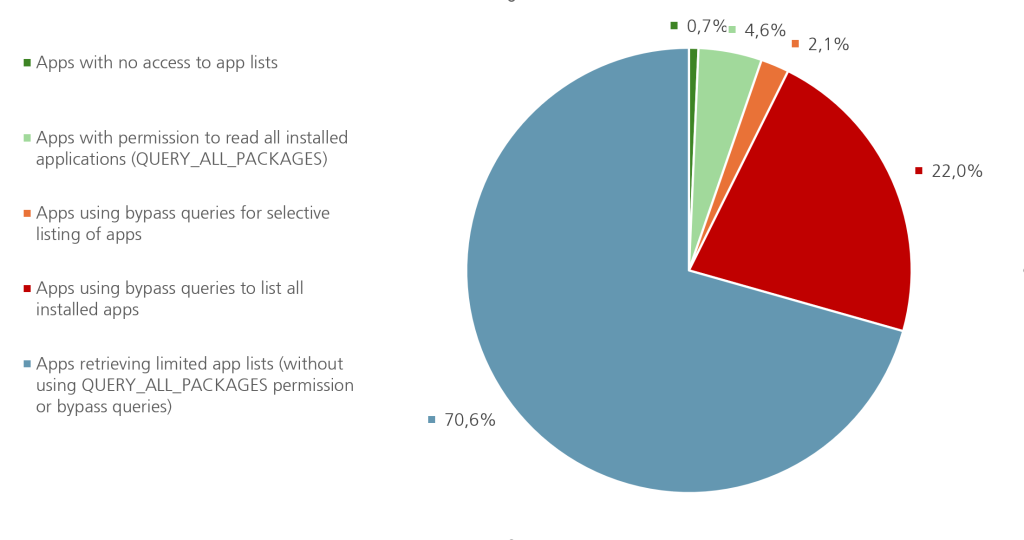
We applied this analysis to the top 2,000 Google Play apps with the following results. Only 0.7% of the tested apps don’t access the list of installed apps at all. More than 70% of the apps access a limited set of system apps preinstalled on the device. From a privacy perspective, this is still reasonable since these apps are no PII and apps often need to communicate with other system components. Almost 5% of the tested apps go through Google’s tedious approval process to cleanly access the list of installed apps through the QUERY_ALL_PACKAGES permission.

A pie chart visualizing how Android apps access the list of installed applications. The largest blue segment, 70.6%, represents apps that retrieve only limited app lists without using the QUERY_ALL_PACKAGES permission or bypass queries. The red segment, 22.0%, shows apps with explicit permission to read all installed applications via QUERY_ALL_PACKAGES. Smaller segments illustrate less common behaviors: 4.6% of apps use bypass queries to list all installed apps, 2.1% use bypass queries for selective app listing, and 0.7% of apps have no access to app lists at all. This chart highlights how widespread installed apps permission bypass is used in android.

The results on the bypass to app list are striking. While only 4.6% of the apps requested the official permission, 24.1% of the apps use the bypass. So apps are roughly six times more likely to use the loophole than to go through the regulated permission pathway.

Among the apps using the bypass, 91% explicitly called Package Manager functions that retrieve full lists of installed apps. Only 9% used selective queries that narrow down the returned list to specific apps of interest, which is more privacy preserving.

Google’s response and the policy contradiction

We reported the bypass to Google via the BugHunters program as a potential privacy vulnerability. Google’s response was that querying packages via an intent action is “working as intended” and is not considered a security issue. At the same time, Google’s own documentation treats the installed app list as “personal and sensitive user data” and requires strong justification and review for the QUERY_ALL_PACKAGES permission.

This leads to an odd contradiction: Google enforces strict controls on one way of accessing installed app lists, while leaving essentially equivalent access open via another mechanism. It even uses the broad intent query pattern in official example code for their advertising SDK. Developers copying these examples may unintentionally give their apps and libraries much more visibility into user devices than needed.

What should change, and what you can do now

To make Android’s package visibility protection meaningful, the platform needs to align the enforcement with its privacy goals. Either broad queries like the generic MAIN intent should be disallowed or restricted, or using them should be treated like requesting QUERY_ALL_PACKAGES, with the same review and policy checks. Otherwise, the permission system and Google Play disclosures cannot be trusted as indicators of what an app can really learn about a device.

Until that happens, individual users have little direct visibility into this behavior. Organizations, however, can use Appicaptor which detects this bypass, and put apps using this technique on their block list for managed devices.

Conclusion

In summary, Android’s protection for the installed app list is currently more of a speed bump than a barrier. A simple manifest configuration gives many apps near‑complete visibility into what you have installed, without your knowledge and without Google’s stricter controls kicking in. As long as this loophole remains open, platform privacy promises around app visibility should be treated with caution and carefully verified, rather than assumed.

Further insights on our used detection mechanism can be read in our extensive paper “Permission Granted? How Android’s App List Protection Fails in Practice” at Springer (to be published in May), presented at the ESORICS conference Workshop MIST 2025.

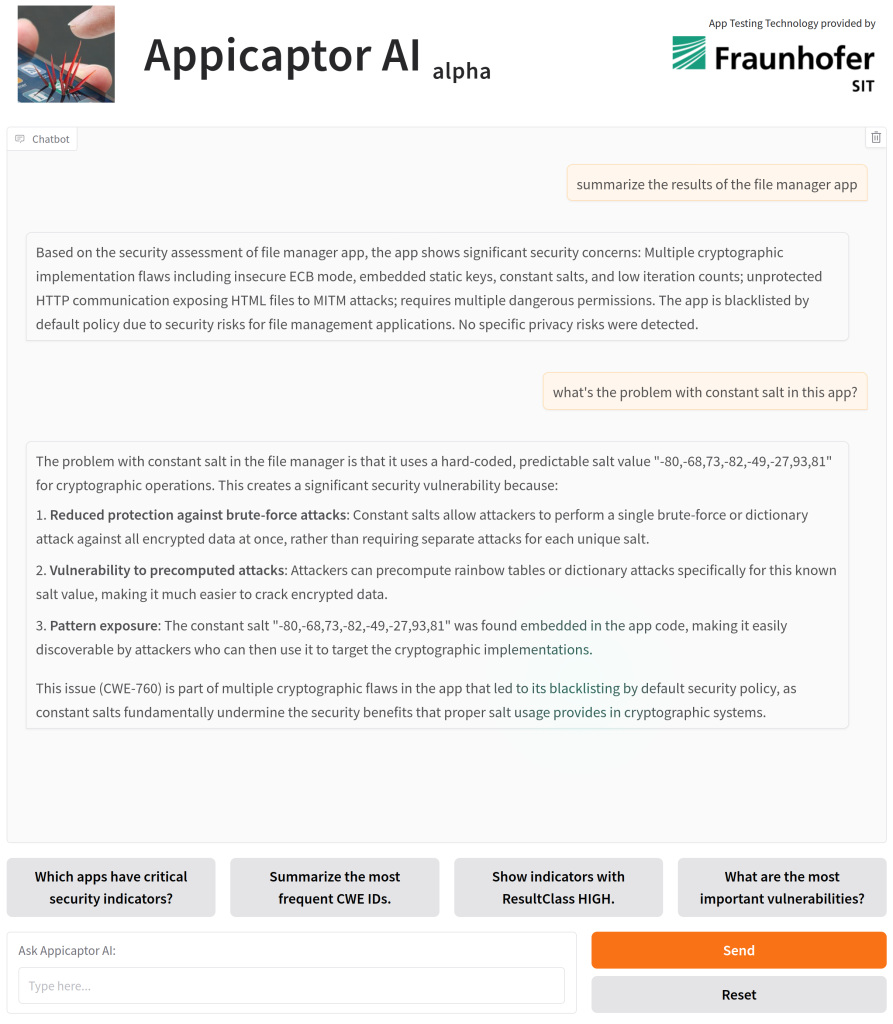
Interactive App Security Reports – Powered by AI

With Appicaptor, we analyze mobile apps with a strong focus on their IT security quality. We provide companies with well-founded assessments of potential risks. These analyses serve as an important decision-making foundation for IT departments and security managers. However, we also know that in practice, receiving complex and extensive analysis reports often leads to very specific follow-up questions. Customers want more details about particular analysis criteria, the relevance in their environment, or background information on specific security issues. Such details are mostly already documented, but sometimes can require some effort to find due to the report’s size. 

To lower the barrier and improving the understanding of result implications for users, in a first step we are currently researching the possibilities for an AI-powered follow-up system on app security reports, based on our current Appicaptor reports.  

Technical Approach 

The centerpiece of the new interactive capability is a Large Language Model (LLM) that acts as a conversational interface to our analysis data and IT security expertise. To achieve this, we are using domain-specific embeddings that enrich the LLM with the context it needs to provide precise, reliable answers. The embeddings are generated from three main knowledge sources: the analysis results of a customer’s individual app report, the structured descriptions of our evaluation criteria (covering aspects such as data protection, cryptographic usage, platform-specific guidelines or permission management), and specialized knowledge from the domain of mobile app security, consolidated from best practices, common vulnerabilities, and security standards. 

By combining these data sources, the aim of our development is that the LLM can go beyond simple report summaries. Instead, thanks to the embedding approach, it retrieves relevant information from the curated knowledge base before responding. This minimizes the likelihood of incorrect outputs and ensures that responses stay consistent and precise. Through customer-specific data loading, privacy through the self-hosted LLM is guaranteed. Furthermore, data is not used for training nor could the LLM access content of other customers reports. 

Added Value for Customers 

With this development, we will reduce the effort required to understand complex security criteria. Instead of issuing additional requests or conducting further research, customers then can instantly receive tailored explanations. Responses are based on their customized report data, combined with industry knowledge. This saves time, improves transparency, and creates confidence in decision-making about which apps to approve or restrict. 

Outlook – Preview at it-sa in Nuremberg 

Although this development is still underway, we want our customers and interested visitors to experience it and get early feedback. That’s why we will showcase a preliminary version of the AI-powered follow-up system at it-sa in Nuremberg from October 7th to October 9th, 2025. You can find us at Hall 6, Booth 416. Visitors will be able to explore the system live and see firsthand the benefits of interactive app security AI reports. 

Third-Party Library Permission Piggybacking in Android Apps

Third-party libraries are widely used in Android apps and take over some functionality, thus making app development easier. As these libraries inherit the privileges of the app, they can often be overprivileged. Libraries, can abuse these privileges, oftentimes through extensive data collection. This article delves into the issue of permission piggybacking, a technique where libraries probe permissions and adapt their behaviour accordingly, without making any permission requests of their own. We thoroughly analysed the top 1,000 applications on Google Play for permission piggybacking. Our results prove that it is extremely widespread, imposing a significant problem that needs urgent attention.

The image shows a pig carrying a cardboard box tied to its back with twine. The pig is walking along a dirt path in a rural setting, with green fields visible in the background. The overall impression is whimsical and humorous, illustrating permission piggybacking.

The Android operating system is home to millions of applications, each providing users with a unique set of features and services. To ensure that these applications interact safely with user data and other app components, Android employs a permission system. However, the reality is far from ideal. The main application often employs Third-party libraries to offload certain tasks and functionalities, which inherit all permissions from the main app. Mostly, these permissions are more than the library requires. Many libraries use this characteristic to probe already granted permissions and use or collect accordingly available data.

Understanding Permission Piggybacking

Permission piggybacking occurs when third-party libraries, integrated within a main app, probe and adapt their behavior according to the already granted permissions, without explicitly requesting any permissions of their own. Libraries utilizing this technique can access user data and critical functionalities, particularly when embedded in an application with high privileges.

Not just a few apps exhibit this issue. Most apps, from gaming apps to critical banking applications, employ libraries. Each app often uses five to ten, sometimes up to 50 libraries, and the app developer often does not know in detail how each library works and what it does in the background. This makes it a significant concern, as these libraries can gather more personal and sensitive user data than required for their primary functionality, posing a considerable privacy risk.

The Research Approach

Our research aimed to assess the prevalence and impact of permission piggybacking in third-party libraries. To achieve this, we developed a novel analysis technique that can detect opportunistic permission usage by third-party libraries. Normal behaviour would be that if a library requires permission to a resource, it first checks if the permission was already granted. If not, the library would generate a permission pop-up to request the permission and then use the restricted resource. During permission piggybacking, the library only checks and uses the permissions already granted, but it never requests it.

In our approach, we used a static analysis to first search for check permissions API calls. Afterwards, we compare it with the permission request API calls. Finally we assign the different API calls to the main app or to the different integrated libraries. As previously described, we evaluated the checked and requested permission API calls on a per library basis. We flag a library as permission piggybacking whenever it checks more permissions than requested.

Evaluation Results

We then put this technique to the test by analysing the top 1,000 applications on Google Play. We aimed to measure the extent of opportunistic permission usage by third-party libraries and determine the prevalence of this technique.

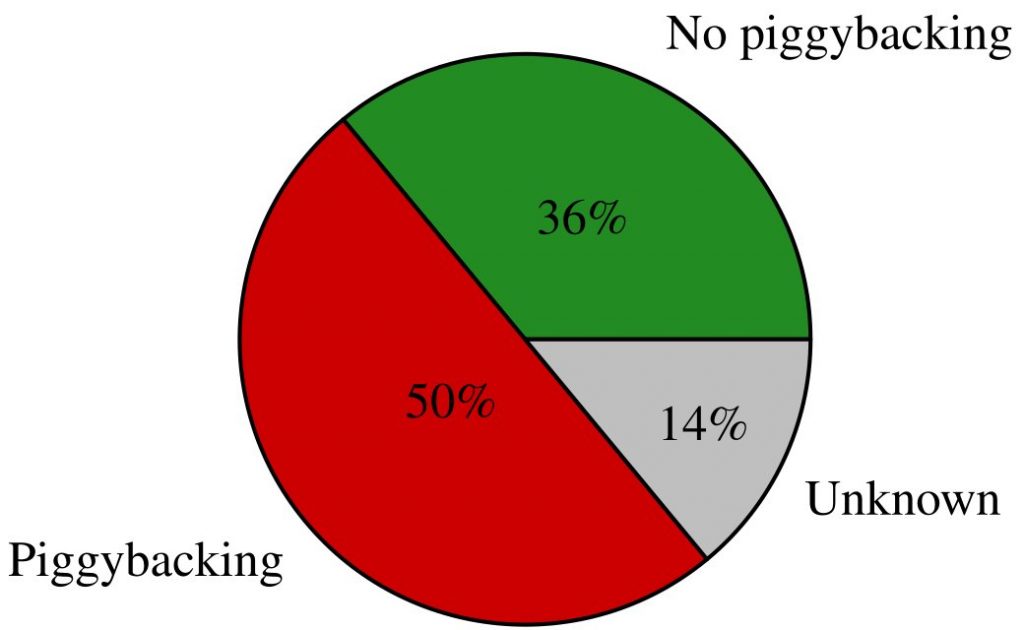
Pie chart showing a 36% fraction with no piggybacking, 50% piggybacking and 14% unknown behavior of 851 different libraries.

Out of the 1000 apps, we have extracted 851 different libraries. In 14% of the libraries we were unable to certainly determine if permission piggybacking is used due to the limits of the static analysis. However, we were able to determine that an overwhelming 50% of the 851 libraries use permission piggybacking.

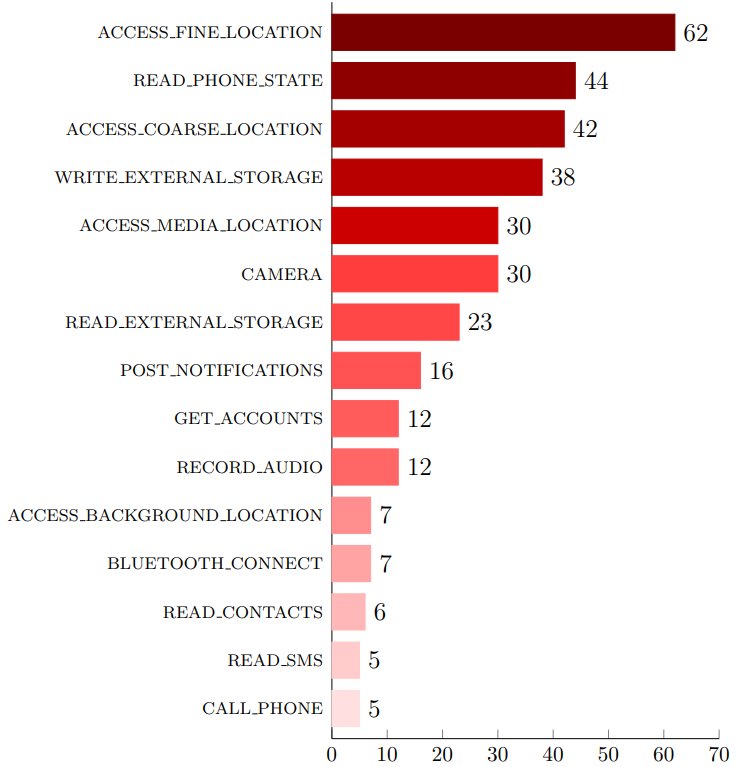
Interestingly, the permissions most often piggybacked were almost exclusively dangerous permissions as defined by Android documentation. Specifically, those were the fine and coarse location (GPS/mobile network cell) and read phone state. These permissions provide access to sensitive user data and make it possible to uniquely identify and track devices as described in our fingerprinting article.

Top 15 of piggybacked permissions in the top 1000 Android apps, by the number of occurrence in non-obfuscated libraries

Furthermore, our analysis revealed that most libraries engaging in permission piggybacking were related to advertising, usage statistics and tracking. These libraries, by their nature have strong interest in extensive data collection.

Further insights on our used detection mechanism can be read in our extensive paper at Scitepress, published at the ICISSP conference 2025. This paper was awarded as the best paper of this conference.

Conclusion and Outlook

Our research underscores that permission piggybacking remains a significant and widespread issue with 50% of all libraries leveraging this technique. Thus, in practice chances of having a piggybacking library installed are very high. To effectively address this, implementing a more granular permission system at the library level is being a viable solution.

As a result, users must be mindful of the permissions they grant to the apps they install until Google implements such measures in Android. Even though for example giving the location permission to a navigation app seems legit, advertisement, or usage statistics libraries integrated into the app potentially piggyback and abuse these permissions for data collection. Depending on the use case of an app, it might be also an option to manually provide the location to the app, e.g. by entering the town name for the weather app once instead of granting the location permission that allows all included libraries to track any location changes of the user.

Appicaptor is already capable of analysing the possible types of accessed data, used permissions as well as integrated third-party libraries. Thus, Appicaptor results already pose a viable foundation for a user’s informed app selection. We are currently working on integrating the permission piggybacking detection approach into Appicaptor for our customers.

Apple’s Required Reason API: Aftermath after one year in practice

Apple designed the “Required Reason” API to enhance user privacy and trust. It helps ensure that app developers clearly communicate the reasons for requesting access to personal data or certain device capabilities. The guideline is now active for almost a year, and we’ve observed that this approach seems to generally work. But in practice, we observe some developers sneaking around these restrictions without Apple acknowledging this fact.

A smartphone with a shield symbol on the screen is shown beside a red apple with a bite taken out of it, symbolizing incomplete privacy.

As we approach the first anniversary of Apple’s Required Reasons API, we feel it’s time to recap it’s privacy gains in practice.

For developers, the Required Reasons API acts as a gatekeeper into the app store. It requires them to provide clear justifications for using certain APIs that access sensitive user data or system capabilities. The users can then inspect and evaluate the provided reason during app install. The principle behind this API is to promote transparency and user control over personal data. A significant contribution is the seamless integration of third-party library required reasons into the main app. This has ensured that the privacy measures extend beyond the core app, covering all the integrated elements.

Diving into the Details: Boot Time Example

To illustrate this, let’s take the example of boot time. The boot time of a device in microseconds is unique and can easily be used for device identification. Thus, such data requires sufficient protection to hinder device fingerprinting and therewith protecting the user’s privacy. Apple has identified two boot time related APIs: systemUptime and mach_absolute_time(). These require developers to provide specified reasons for their use. Apps or libraries accessing these methods must provide a reason in the app’s/library’s PrivacyInfo.xcprivacy file. This XML-file contains among other things a key specifying a resource linked with a reason for accessing this resource. Apple provides different short identifiers which specify a usage purpose as shown here:

<key>NSPrivacyAccessedAPICategorySystemBootTime</key>
<string>35F9.1</string>

In this example, the short identifier specifies the following reason, documented by Apple:

“Declare this reason to access the system boot time in order to measure the amount of time that has elapsed between events that occurred within the app or to perform calculations to enable timers. Information accessed for this reason, or any derived information, may not be sent off-device. There is an exception for information about the amount of time that has elapsed between events that occurred within the app, which may be sent off-device.”

A Year of Practice: The Good…

To evaluate these advancements in practice, we have collected the most popular third-party libraries for iOS apps. Next, we searched for libraries, known for device fingerprinting activities. The Required Reason API typically impacts such libraries the most, since they heavily rely on this data. In practice, the top three libraries leveraging device fingerprinting techniques make up more than 80% market share. Thus, analysing the top three libraries already provides broad coverage. We found that the top three libraries in fact use APIs from the “Required Reasons API” list, but provide a proper reason declaration. This means, that whenever a respective API is used, an appropriate cause in the PrivacyInfo.xcprivacy is provided. Thus, developers are adhering to the rules, and/or Apple is effectively enforcing these rules in the App Store.

…and the Bad

However, we have observed instances in some used libraries where developers have found ways around these obligations. These libraries use other methods for querying boot time, such as sysctl and sysctlbyname.

In iOS, sysctl and sysctlbyname are system calls enabling access to kernel parameters at runtime. They allow developers to query essential information about the system, such as CPU and memory statistics or the boot time. The sysctlbyname call offers a more user-friendly access method by using string identifiers instead of integers. Thus, an alternative way to query the boot time with this function would be:

sysctlbyname("kern.boottime", &bootTime, &size, nil, 0)

Additionally enforcing these APIs would require evaluating the arguments during the static analysis in Apple’s app publishing process. Evaluating the arguments during a static code analysis can sometimes be complicated if the argument isn’t a constant. Advanced techniques like symbolic execution or data dependency analysis might be necessary, features already applied in Appicaptor.

We have already contacted Apple on May 2nd, 2024 and informed them about missing items in their Required Reason API. However, they did not respond up until this day. We think that Apple is well aware of these APIs but doesn’t want to confirm this due to political reasons.

The Road Ahead

In conclusion, we see that Apple strides in the right direction, but there are still loopholes that need to be addressed. We look forward to seeing Apple continue to enhance its privacy measures, closing remaining gaps. Meanwhile, we continue to monitor Apple’s Required Reason APIs usage with Appicaptor and check for violations.

Visit us at it-sa 2024: Threats of Device Fingerprinting for Enterprises

What data is transferred by business apps, and how secure is their processing? Our research shows: If your employees use apps arbitrarily, you put your company’s security at risk.

At it-sa 2024, we present our app analysis framework Appicaptor. You can use it to automatically check whether apps are compliant with your company’s IT security demands. New results within the Athene funded research project FiDeReMA will improve Appicaptor analysis techniques. Among other things, the goal is to identify and evaluate privacy implications when using arbitrary apps.

A fluffy blue monster holds a smartphone displaying the message "DENY ALL COOKIES," referencing cookie permissions. A bowl of black cookies sits beside it, creating a humorous contrast between the tech message and the monster's love for cookies.

Our current efforts to improve Appicaptor revolve around different privacy aspects:

  • Device fingerprinting
  • App DSGVO Consent Banners
  • Permission piggybacking of Android in app third-party libraries

Device Fingerprinting

Device fingerprinting is a technique used to uniquely identify devices and therewith typically also users. Mobile apps make use of different device properties such for example device name, software version and others. They combine such values mostly with a hashing function to a unique identifier. Use cases for device fingerprinting are app usage statistics, fraud detection and mostly targeted advertisement.

When employees install apps with device fingerprinting on their mobile corporate devices, it can lead to the loss of sensitive business data for companies. Attackers can acquire the collected data and potentially identify the devices of company management, spy on trade secrets, and ascertain customer contacts. In practice, the Cambridge Analytica case shows how sufficient data from various sources can be used to analyze users and manipulate them through targeted advertising, thereby influencing even election results.

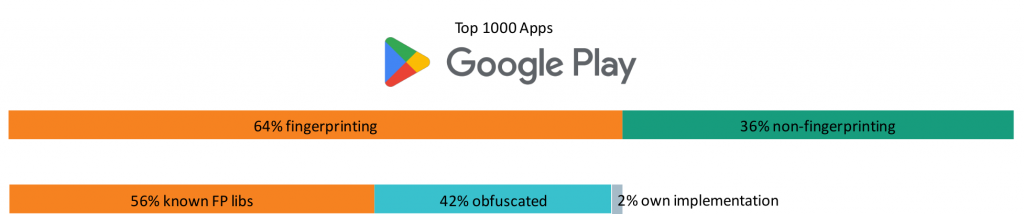
Identified Device Fingerprinting Activity for the Top 1.000 Android Apps (source)

Our analysis results show that more than 60% of the top 1,000 apps on Google Play employ device fingerprinting techniques. This allows a unique device identification even across app borders.

We extracted 30,000 domains from the most popular 2,000 iOS and Android apps. Afterwards, we filtered out domain names for the most prevalent device fingerprinters covering 90% market share. We were able to prevent device fingerprinting in 40% of the cases by using publicly available domain blocklists. These lists are specialized on tracking and advertisement domains and can be easily applied to for example a firewall. Another 40% would easily be blockable by updating the blocklist: Some fingerprinters use random subdomains for their communication in the form of https://8726481.iFingerprinter.org giving many possibilities to be blocked.

We also proposed an approach to randomize return values of popular properties used for device fingerprinting. Our results prove that this technique dramatically reduces the uniqueness of the device fingerprint. Nevertheless, respective APIs remain accurate enough for their intended use cases. The hope is that our proposed techniques are included in future Android and iOS releases.

In-App DSGVO Consent Banners

Many of the previously mentioned device fingerprinting properties would typically require user consent as stated by the DSGVO. According to recent court decisions and EU regulations, rejecting must be just as easy as accepting consent banners. However, many companies don’t obey such regulations. Those who obey mostly apply dark pattern to push the user into accepting all tracking.

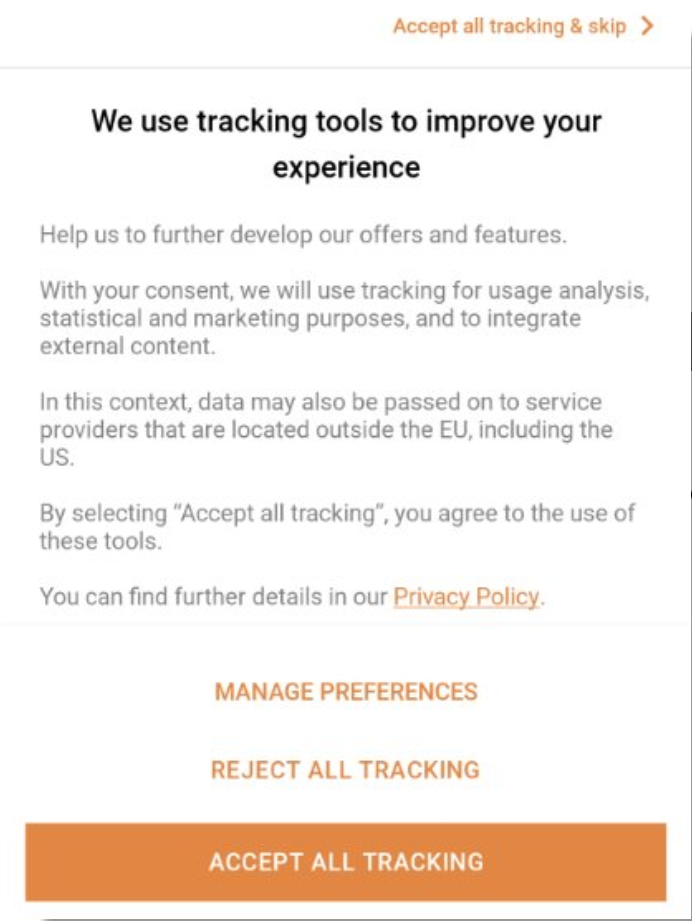
Example DSGVO Consent Banner with the option to reject all tracking on first instance.

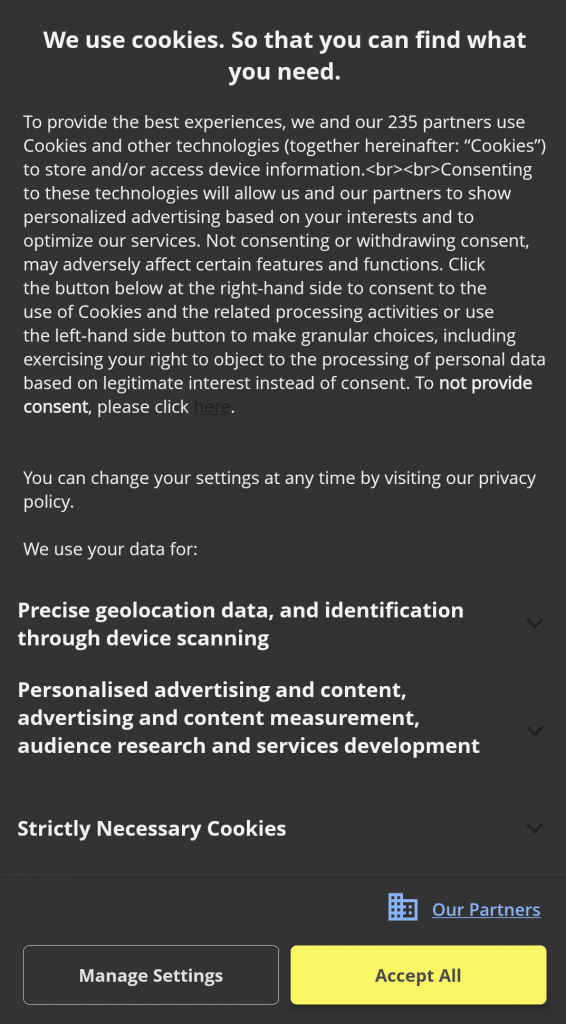
We are currently working on detecting if apps provide a reject option on first instance, without having to click through several submenus. In our attempt, we are employing artificial intelligence to analyse such consent banners for reject options on first instance. The results yield a success rate of 82%. Some apps try hard to remain within legal boundaries but make it hard for users to reject data usage. Can you find the first level reject option in the following consent banner? – Yes there is an option.

Example DSGVO Consent Banner that uses dark patterns to hide reject tracking option.

We have collected the most interesting consent banners and bundled them into a game. With the app “Reject all cookies” you need to overcome several consent banners and keep your data private. Having rejected all “cookies” in the app you can win real cookies at our it-sa 2024 booth (6-314).

Permission piggybacking in Android Apps

Traditionally, Android apps comprise a main application and several supporting libraries. These libraries often inherit permissions from the main app, granting them unnecessary access beyond their core functions. This leads to permission piggybacking, where libraries exploit inherited permissions to gather data without requesting them directly. Advertisement and tracking libraries particularly leverage this tactic to collect extensive user data.

We have developed an analysis tool to detect third-party app libraries only probing for already granted permissions, without ever requesting permissions themselves.

Analysing the top 1,000 apps on Google Play reveals that 50% of the libraries exhibit this permission probing behaviour. Presumably, these libraries then adapt their behaviour according to the granted permissions of the main app. Accordingly, they collect more or less data, as available. Most of the identified libraries exhibiting such behaviour are well-known advertising and tracking libraries. This fact underlines the urge for a finer granular permission system to separate main app and third-party libraries.

Visit us at it-sa 2024 and have a cookie with us!

You’ll find us in hall 6, booth number 6-314 for a demonstration and discussions.

iOS Privacy Manifest: Data Collection and Usage in Top Free iOS Apps

Since May 2024, the inclusion of an iOS Privacy Manifest has been a requirement for app submissions with newly added third-party SDKs. We analyzed first results about data collection practices, compliance issues with Apple’s guidelines, and privacy risks posed by SDK providers.

Apple mandates that all app submissions with specific newly added third-party SDKs have to include a comprehensive iOS Privacy Manifest. This manifest outlines the data collection and usage practices of apps, providing users with transparency and empowering them to make informed decisions about their digital privacy. As outlined in our previous blog post, Appicaptor correlates the privacy manifest contents with additional privacy findings through static analysis.

In our evaluation, we analyzed the iOS Privacy Manifests definitions of our app sample set, that consists of the most popular 2,000 free iOS apps available on the German Apple App Store in June 2024.

Apple mandates that apps with newly added third-party software development kits (SDK) of one of the 86 listed third-party SDKs have to include a iOS Privacy Manifest (see Apple Developer Support). Our analysis of the app sample set revealed the presence of all 86 SDKs in at least one app. We evaluated whether apps integrating these SDKs adhered to the privacy manifest requirement: Our findings indicate that only 47 out of the 86 SDKs were associated with at least one app that defined a privacy manifest. Conversely, the remaining 39 SDKs were utilized at least within one app within the sample set, but no app employing these SDKs defined a privacy manifest. This discrepancy may stem from the following factors: either the SDK developers may have not provided a privacy manifest template for their SDKs, or the app developers have not incorporated SDK versions that include privacy manifest template or explicitly deleted the manifest entry, or the app update does not include a newly added third-party SDK from the list. So our analysis can only investigate the Privacy Manifest declarations of about half of the libraries that Apple has selected. However, these first results already provide interesting insights in the data analytics industry.

What data is requested in real apps and why?

As first evaluation on the manifest content, we evaluated the data types declared within the iOS Privacy Manifests of our app sample set. Our analysis revealed that 50% of the apps declare in the manifest that they collect data types such as OtherDiagnosticData, CrashData, and DeviceID. Especially the data type DeviceID is privacy-sensitive as it provides the possibility to correlate actions of users across the sandbox boundaries of individual apps.

The full list of collected data types and the number of apps in which such data is collected according to the privacy manifest is given in the following graph. It can be seen, that a wide range of data types are defined in the app set, including very sensitive data types as Health (Health and medical data), PhysicalAddress, PreciseLocation and SensitiveInfo (racial or ethnic data, sexual orientation, pregnancy or childbirth information, disability, religious or philosophical beliefs, trade union membership, political opinion, genetic information, or biometric data).

Although Apple clearly specifies how data type classes should be defined in the iOS Privacy Manifest, we found 205 apps within our app sample set that included malformed or self-defined data types in iOS Privacy Manifests. Consequently, these do not align with Apple’s specified requirements and the discrepancy highlights issues in the implementation and adherence to Apple’s guidelines.

Following the evaluation of data types, we proceeded to assess the given purposes. The next graph presents the distribution of purposes defined in the iOS Privacy Manifests per app. Our analysis indicates that collecting data is declared for the purposes of AppFunctionality or Analytics in over 60% of the apps of the sample set. Consistent with our findings in the data type evaluation, we observed that a substantial number of apps (235 apps) which included purpose definitions deviate from Apple’s expected values. These are summarizes in the category Malformed / Self-defined Purpose in the chart below.

Do the declared data type and their reasoning align?

Further analysis was conducted to determine which data types are collected for which specific purpose and in how many apps of the app sample set this occurs. For this evaluation, we analyzed the iOS Privacy Manifest definitions of the 2,000 apps in our sample set, focusing on tuples of data types and associated purposes. The following graphic illustrates which data types are accessed for which purposes. The size of the circles corresponds to the number of apps in which that specific data type-purpose tuple was defined in the iOS Privacy Manifest. It is interesting to see, that collecting certain sensitive data types such as SensitiveInfo, PhysicalAddress, PreciseLocation and Health are declared for purposes besides AppFunctionality and almost all data types are used also for the purpose of Analytics, which could have an effect on user’s privacy.

Are there component providers that stand out in terms of data type and usage?

Data types and purposes are defined for specific components in the iOS Privacy Manifest. For that reason, our next focus was to investigate if specific purposes to collected data types are specific to certain component providers. Therefore, the following analysis examines the purposes for collected data types grouped for each component provider within the iOS Privacy Manifest. The following graph highlights the relationship between purposes and the SDK provider. To do so, we associated the providers to their SDKs and extracted the 20 most frequently contained SDK providers in the Privacy Manifests within the evaluated app set. We analyzed in how many apps each purpose is defined for these top 20 providers within the app set. In the diagram it can be seen that certain providers, such as Firebase, concentrate on a few specific and targeted purposes. In contrast, others, like Adjust, request data for a wide array of purposes. As the purposes relate to the activities of the SDK providers, this can be seen as summary on the functionality aspects provided by the SDK components and their providers.

Similar to the evaluation of the specific purposes related to component providers, we expanded the view to cluster the information according to the data types accessed. To do so, we again took the 20 most frequently mentioned SDK component providers in the Privacy Manifests within the evaluated app set and counted how many apps declare a data type and purpose tuple for these top 20 component providers. In the following graph the size of the circles in the graph corresponds to the number of apps in which each specific data type-purpose tuple was declared in the iOS Privacy Manifest. Like the former evaluation, this graph shows, that certain component providers (like Firebase) focus on certain data type and purpose tuples, whereas other component providers define various data type and purpose tuples (e.g, Google and Facebook).

The data type definition may additionally contain boolean processing flags, that should specify external usage of the data. The processing flag linked specifies that the data type is linked to the user’s identity, whereas tracked specifies that the data type is used to track users. Our final evaluation of the Privacy Manifest data of the app sample set focus on the aspect whether certain data providers specify data types with these processing flags or not.

Data types flagged with tracked can be shared with a data broker. Therefore, if the processing flag tracked or linked/tracked is set, this may threaten the user’s privacy significantly. Therefore, we examined what processing flags are set by different component providers for requested data types. We took the ten most frequently mentioned SDK component providers in the Privacy Manifests within the evaluated app set and analyzed how many apps declare a data type, processing type and purpose tuple for these top ten component providers. The size of the circles in the following graph corresponds to the number of apps in which each specific data type-processing flag-purpose tuple was defined in the iOS Privacy Manifest. The graph groups the data types in relation to the requested purpose in circle groups. The circle group’s label states which processing flags are set to true: If the circle group is labeled with linked, then only the data type is linked to the user’s identity. If circle group is labeled with linked/tracked, then the data type is linked to the user’s identity, and it is used to track users. Elements of a circle group that has no label are neither linked nor tracked.

A significant difference in the processing flag usage can be seen when comparing the results for Google and Facebook. Google defines the processing flag linked or no processing flag for most data types and purposes. In contrast, Facebook sets the processing flag with the most possible extent linked/tracked for most data types and purposes.

Conclusion

The analysis of iOS Privacy Manifests for the 2,000 most popular free iOS apps on the German Apple App Store in June 2024 reveals several insights about data collection practices and compliance with Apple’s guidelines.

About half of the Privacy Manifests in apps have declared to collect data type OtherDiagnosticData, CrashData or DeviceID, with various sensitive data types also being collected. However, the presence of apps with malformed or self-defined data types indicates inconsistencies in adhering to Apple’s guidelines. Additionally, the observed entries for data collection purposes were found to violate Apple’s specification. This undermines the effectiveness of the privacy manifest and hopefully will be addressed with checks by Apple during the app review process.

However, even in this preliminary analysis with a lot of data missing for SDKs, the benefit of the Privacy Manifests can be seen. This way, it is possible to inspect the relations between collected data types, purposes and components, showing that in some apps sensitive data types are collected for purposes not related to the app’s functionality.

The examination of specific data type-purpose tuples and their association with component providers revealed that certain SDK providers, focus on targeted purposes, while others, request data for a broader range of purposes. Notably, the processing flags for data types, particularly those flagged as tracked, pose significant privacy risks. The contrast between providers, which primarily uses the linked flag, and those which extensively use the linked/tracked flag, may underscore the varying levels of privacy impact across different SDK providers.