Content Security Policy – Important Defense-in-Depth missing for many Apps

The Content Security Policy (CSP) defines restrictions for webviews to reduce the attack surface of applications for Cross Site Scripting (XSS) and other attacks. The stricter the policy is configured, the fewer possibilities remain for attackers to inject malicious functionality in case of input validation flaws. This is especially important for hybrid apps, such those build with Cordova, that use JavaScript to access granted OS functionality via a JavaScript bridge. If an attacker can inject own code to a hybrid app’s webview, he can alter the way how the app uses accessible data and sensors.

A strict CSP can prevent the execution of injected functionality by restricting the executable code fragments to resources that are less accessible to an attacker. However, strict restrictions also require alternative programming styles during app development, which sometimes are inconvenient or unknown to the developer. Additionally, some external libraries or other existing code may not work out of the box with restrictive CSP settings, increasing the pressure for using a less restrictive policy.

With Appicaptor we inspect apps for configured CSPs to evaluate the restrictions for the security of the app. A single missing sanitation of user input may render a hybrid app vulnerable for hijacking of the app’s functionality in a malicious way. As the vulnerabilities can be introduced to apps by a missing ‘S’ for the HTTPS scheme when loading external JavaScript resources or by a flawed sanitation of user input, hybrid apps should reduce these risks by applying a ready to use second line of defense using CSPs. However, 60.5% of the analyzed hybrid apps for iOS and 72.3% of the hybrid apps for Android do not define a CSP. The analyzed app set each consists of the most used 2,000 apps as ranked by the Android and iOS App Stores.

One might consider a ratio of more than 25% for hybrid apps that do use CSP as a second line of defense an already good starting point. However, analyzing the actual CSPs of these apps shows that many policies are weak. In iOS 39.5% (Android: 27.6%) of the hybrid apps with a CSP deactivate important protective restrictions and therefore could be rated equally to apps with no defined CSP from the perspective of an attacker. So let’s see why.

This is a typical basic example of an observed CSP:

<meta http-equiv="Content-Security-Policy" content="default-src 'self' data: 'unsafe-inline'; img-src *;"> 

CSPs are constructed in a simple fashion: Each section starts with the source keyword the directive should be applied to and is terminated with a semicolon. In the example the CSP starts a directive section with the default-src keyword. Its declared restrictions are used as fallback for other, not defined directives. For example, the directive for script-src and object-src are not declared, so the configuration of 'unsafe-inline' is applied to both of them, but not to 'img-src', as it is declared in the example and therefore the fallback to 'default-src' is not applied by the browser.

The intention here is to allow loading sources only from 'self', which is the source where the HTML page with the CSP entry was loaded from, to prevent injection of external scripts for Cross Site Scripting. Only images are allowed to be loaded from any source, declared by star character in the img-src directive.

However, by declaring the keyword 'unsafe-inline', this CSP allows executing JavaScript code injected at any place in an HTML page, such as

User entered <script>doSomethingBad();</script> text 

or

<div onclick="doSomethingBad();">Click Me</div>

Allowing 'unsafe-inline' together with the data: scheme for the object-src in the example allows an attacker to inject script code to <object>, <embed>, and <applet> elements:

<object data="data:text/html,<script>doSomethingBad();</script>"></object>

or by using JavaScript inside an SVG, embed as data: URL:

<embed src="data:image/svg+xml,<svg onload='doSomethingBad();' xmlns='http://www.w3.org/2000/svg'></svg>" type="image/svg+xml" width="1" height="1" /> 

Fortunately, in most common cases the code injected via data: scheme is treated as a separate frame. It cannot interact with the JavaScript bridge of a hybrid app, which is located in the parent index.html page and the Same Origin Policy prevents the access to it. However, attackers can still use this for UI manipulation attacks by tricking users to disclose credentials or other critical data in crafted dialogs.

Besides many other possible shortcomings observed CSP are having regarding inline XSS protection, about 10% of the analyzed hybrid apps (iOS / Android) do not properly restrict the sources for loading scripts. This is caused by using the star character as a wildcard for the scheme. This way an attacker would be able to inject a script element that can load malicious code from any domain. The same applies if instead the scheme https: is used. It seems that this configuration option is too confusing for developers as for some it might look like as if this configuration would just prevent HTTP access. However, if used it allows access to any domain via HTTPS. So, when some developers use the https: together with a list of domain names they want to allow, this domain list does not have any effect, as any domains are already allowed:

default-src 'self' data: https: ssl.gstatic.com maps.google.com;

Such ineffective domain restrictions were observed in about 7% (iOS / Android) of the analyzed hybrid apps, which might give a false sense of security. Instead, the developer would need to specify the protocol together with the scheme (e.g. https://ssl.gstatic.com) to restrict access to listed domains and allow this access only via HTTPS.

Unfortunatly, in about 5% (iOS / Android) of the analyzed hybrid apps also parsing errors were detected that can prevent the intended protection. In general, such parsing errors could lead to more strict or less strict restrictions, depending on which part of the CSP is affected. However, as more strict policies that are accidentally created are more likely to cause functional issues than in the case of accidentally created less strict policies, the chance is much higher that those issues are detected in functional testing. For example, we observed parsing errors that prevent some or all directives from being applied. In all these cases, the errors lead to a less strict CSP, e.g. by omitting a good strict default-src directive that is now missing for a secure fallback for other non-specified directives.

CSPs can have a strong impact on app security. They are especially important for hybrid apps. The analysis results show that it is important to check if apps do use a CSP and that the CSP needs to be evaluated carefully. In case of doubt, developers should check the CSP with a free tool such as the Google CSP Evaluator to better understand the impact of the directives and to prevent parsing flaws.
Concerns about Apache Log4j in Android Apps

The recently published CVEs for the Apache Log4j Java logging library raise the question if also Android apps suffer from the same fatal exploitability, like the huge number of server and desktop applications.

In a first response, we checked the presence of Apache Log4j in the Appicaptor monitored 2,000 most popular Android apps and in the set of apps scanned by our Appicaptor customers to detect which Log4j versions are contained. Our analysis shows that currently less than 1% of the apps contained Log4j 1.x and none of them contained Log4j 2.x.

Regarding the current JNDI CVE-2021-4104, CVE-2021-44228, CVE-2021-45046 and CVE-2021-44832 a further positive news is: Our manual tests proved that the required classes for a JNDI lookup are not available in Android. So, even if an app contains a Log4j version that is vulnerable to JNDI lookups and an attacker manages to trigger a malicious JNDI lookup, the app would not be able to perform the JNDI lookup and -at most- could only crash with a ClassNotFoundException. Therefore, no remote code execution in possible in this case.

An older vulnerability, tracked by CVE-2019-17571, is related to a server socket for receiving log messages. The SocketServer class in Log4j 1.x is vulnerable to deserialization of untrusted data, which can be exploited to remotely execute arbitrary code when combined with a deserialization gadget while listening to untrusted network traffic for log data. The additionally tracked CVE-2020-9488 for Log4j 1.x describes an improper validation of certificates with host mismatch in Apache Log4j SMTP appender. This could allow an SMTPS connection to be intercepted by a man-in-the-middle attack which could leak any log messages sent through that appender. However, usage of both aforementioned functionality is uncommon in released mobile apps so that the overall risk of an exploitation is considered low.

Nevertheless, as Log4j 1.x is not maintained anymore, it should be replaced with an alternative and actively maintained logging library that does not contain known vulnerabilities.

Rise and Fall of Specific Unique Identifiers

Retrieving a unique identifier may allow app developers, advertisers, analytic companies and others to identify the user’s device or the user himself. Furthermore, most of these identifiers are persistent means for tracking, advertising and marketing activities on devices. Unique identifiers might however be also necessary for certain app functionality to work as expected.

Appicaptor tracks app’s access to various unique identifiers that can be categorized in three different groups:

  • The first group refers to mobile communication relevant IDs. Examples of this category are access to the phone’s IMEIs and MAC addresses, country code of the mobile network provider, as well as the phone / voice mail number, serial number of the SIM card and mobile subscriber ID (IMSI / TIMSI) of the user.
  • The second group is identification information about the hardware or operating system given by the operating system itself. When the mobile operating system is compiled different parameters for model, hardware, serial and display size are included in the operating system build. Furthermore, a build fingerprint can distinguish different operating system builds even if the operating system version is equal.
  • The third group consists of identifiers
    • like the Android Device ID, Advertisement ID,
    • properties that the user could configure like font size / type, audio volume, timezone, display orientation lock and screen brightness, Bluetooth pairings, power saving mode configuration, audio singnal output port (speaker, headphones, Bluetooth, etc.)
    • installed app list
    • hardware parameters like cpu and set of available hardware sensors (gyroscope, barometer, …)
    • other parameters like battery or device memory (RAM and data) usage.

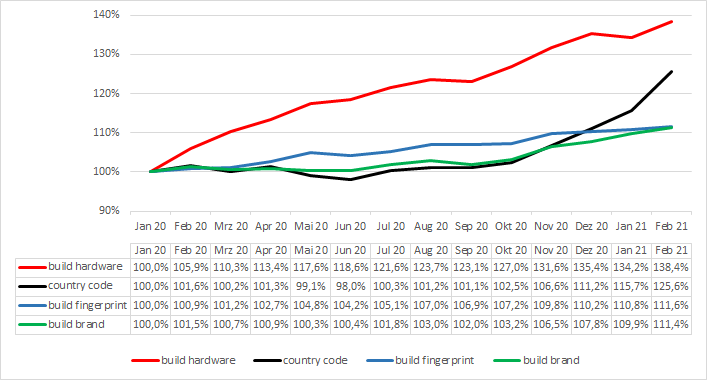
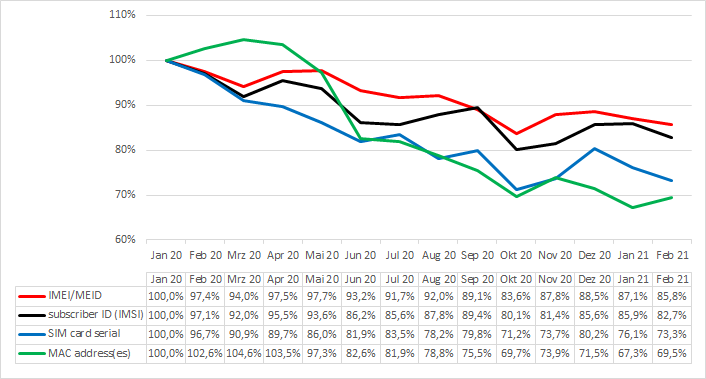
Every month Appicaptor evaluates the IT security quality of thousands of Android and iOS apps. The following two charts depict for each month which identifier usage is rising and which is falling. The charts plot the identifier usage (total number of apps within the 2,000 most popular apps in German Google Play Store that accesses an identifier) relatively to the identifier usage in January 2020.

Rising Unique Identifiers: identifier usage within the 2,000 most popular apps in German Google Play Store relatively to the identifier usage in January 2020
Falling Unique Identifiers: identifier usage within the 2,000 most popular apps in German Google Play Store relatively to the identifier usage in January 2020

As the relative change (given in the two charts before) does not give the perspective, which identifiers are commonly utilized and to which extent, the following table provides the absolute numbers. This table shows how many apps within the 2,000 most popular apps in German Google Play Store access an identifier in the Appicaptor analysis runs of January 2020 and February 2021. Furthermore, based on every monthly analysis run between January 2020 and February 2021 we predict a trend if the identifier usage is rising or falling based on our data.

NameIdentifier Uage
(in January 2020)
Identifier Uage
(in February 2021)
Trend
Unique Android ID1,944 1,947stable
Build model1,9471,945stable
Build
manufacturer
1,9161,941
Build fingerprint1,6791,873
Build product1,6331,760
Build brand1,5371,712
Build hardware1,1791,632
Build display1,4781,486stable
Country Code +
Mobile Network
Code
9221,158
Build serial8771,016
Mobile Country
Code
8621,000
Wifi-MAC address754717
IMEI/MEID689591
MAC address(es)547380
Phone number281264
Subscriber ID
(IMSI)
312258
SIM card serial243178
Voice mail
number
6962stable
Total number of apps that access an identifier according to Appicaptor analysis of the 2,000 most popular apps in German Google Play Store

The analysis of Appicaptor shows that the access to (generally speaking) unspecific unique identifiers (like the build related parameters) is currently rising. One might think that the access to unspecific unique identifiers (like the build brand or hardware) may be not an privacy issue since they are equal at thousands of devices/users. And that the access to a more specific unique identifier (like the SIM serial or phone number) should be more an privacy issue. However, there is more to take into consideration.

A detailed manual inspection of access patterns and looking on the landscape of the mobile value-chain shows that most of the accesses of unspecific unique identifiers are executed in 3rd party libraries, which are included in the app by the developer. Furthermore each of these unspecific information portions (if seen alone) can not be utilized to identify a specific device or person. But certain libraries access a magnitude of these unspecific unique identifiers, creating a device fingerprint from all them and transmit the data to a server backend. As an other example, an open source library of this type can be found here. It claimes to create a device identifier from all available Android platform signals, that is fully stateless and will remain the same after reinstalling or clearing application data.

The further manual inspection of other identified libraries shows as well, that libraries which probably execute device fingerprinting are utilized in many apps of different app types. A linkage between the device fingerprint and your person is possible, when you think of an app that utilizes an library that joins identifiers as device fingerprint and you give that app information about your person (name, email address, etc.). That would bring the provider of the library in the position to track your identity throughout the usage of different apps, based solely on unspecific unique identifiers.

So what can we learn from these numbers?

  • The usage of almost all specific unique identifiers are currently falling. That trend is supposed to be related to privacy preserving functions in the mobile operating systems that limit the app’s access to correct values of these identifiers. If you enable these privacy preserving functions, fake random values are provided.
  • The usage of unspecific unique identifiers is currently rising throughout all identifiers. From our perspective that rising is based on the reasoning outlined above (device fingerprinting) as well as to facilitate user identification in the presence of the current drawbacks (uncertainty if correct or fake specific unique identifiers are reported to the app by the operating system).

Therefore, in the app evaluation process one should take a look at the composition and magnitude of the list of accessed unique identifiers of an app: if many unspecified unique identifiers are accessed, this should draw one’s attention the same way as the access of an specified unique identifier should do.

Unwanted Functionality Apps in Google Play Store

Once again, a list of apps in Google Play Store with unwanted functionality was published. This list holds apps forcibly displaying ads on the user’s lock screen, triggering video and audio advertisements even while the phone was asleep, and displaying out-of-app ads that interfere with a user’s interaction with other applications on their device. This unwanted functionality did not immediately appear after app installation, but became visible at least 24 hours after the application was launched. Some apps wait patiently 2 weeks after installation to impede the occurring disturbances to be brought into connection with the liable app.

We have checked the published list and found 7 unique apps on it that have been analyzed in the last months by Appicaptor. All of them were blacklisted by Appicaptor’s standard policy intended for medium security requirements. The rating is based on generic rules regarding a correlation between the app model, extracted by machine learning from the app’s description text, and static analyzed properties of app content.

Although the unwanted functionality has not being directly identified by Appicaptor, we are pleased to see that Appicaptor’s standard policy had identified these apps as not compliant with business requirements. This shows the informative value of the standard Appicaptor policy set that is continuously revised and updated over the last years.

Appicaptor Security Index 2018

The use of apps in enterprises requires a critical consideration of the risks. Today, we have published results of automated Appicaptor analyses for the top 2,000 free iOS and Android apps.

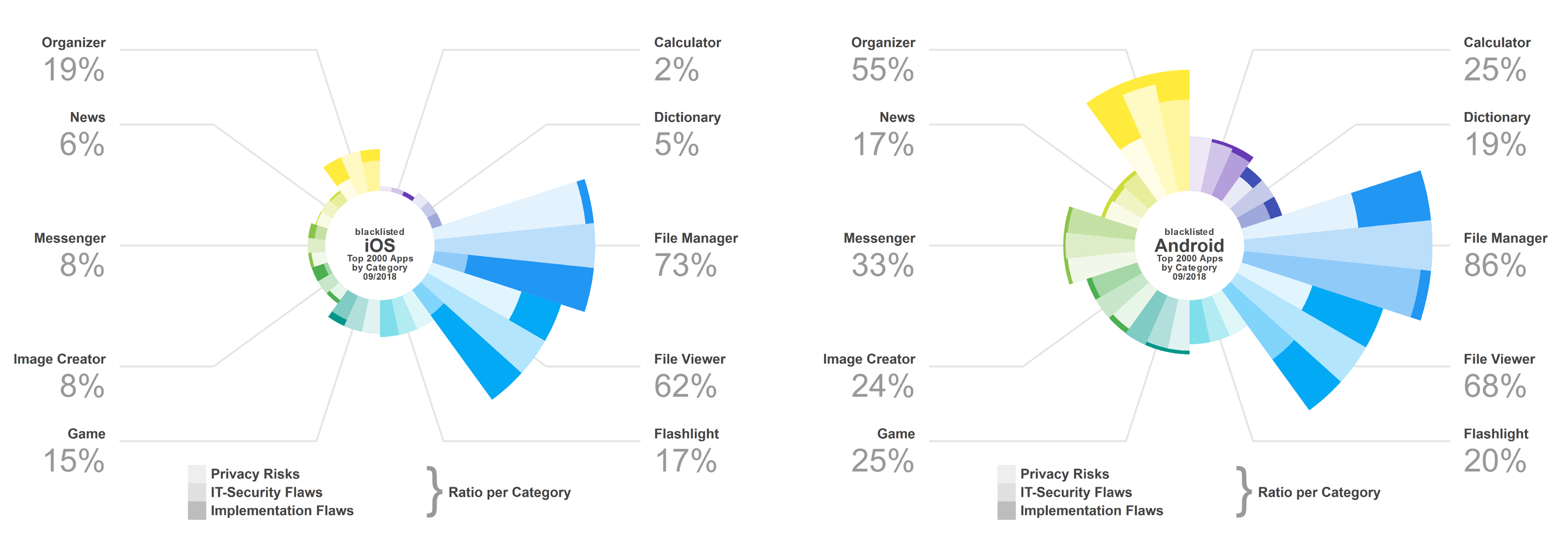
Chart of blacklisted apps per category, Appicaptor Security Index 2018
Blacklisted apps per category. The bars for each exemplary selected function class show the respective proportion of the three risk classes.
Appicaptor Security Index, September 2018

When assessing the fitness for corporate use, it is not very surprising that apps for processing of corporate data are quite critical. In particular, the functional class of the File Manager apps shows a significant risk of usage with 73% iOS apps classified as unsuitable for corporate use (see figure). This is even higher with Android at 86%. The reasons for the blacklisting of both platforms are a very high ratio of IT security weaknesses and privacy relevant risks.

The report also shows new test insights about security characteristics of apps using the MultipeerConnectivity API from iOS. This API allows developers to easily implement a direct exchange of data between devices via wireless communication. This can be done both authenticated and encrypted, but the appropriate options have to be used by the developer.

iOS peer-to-peer transmission with lack of encryption and authentication
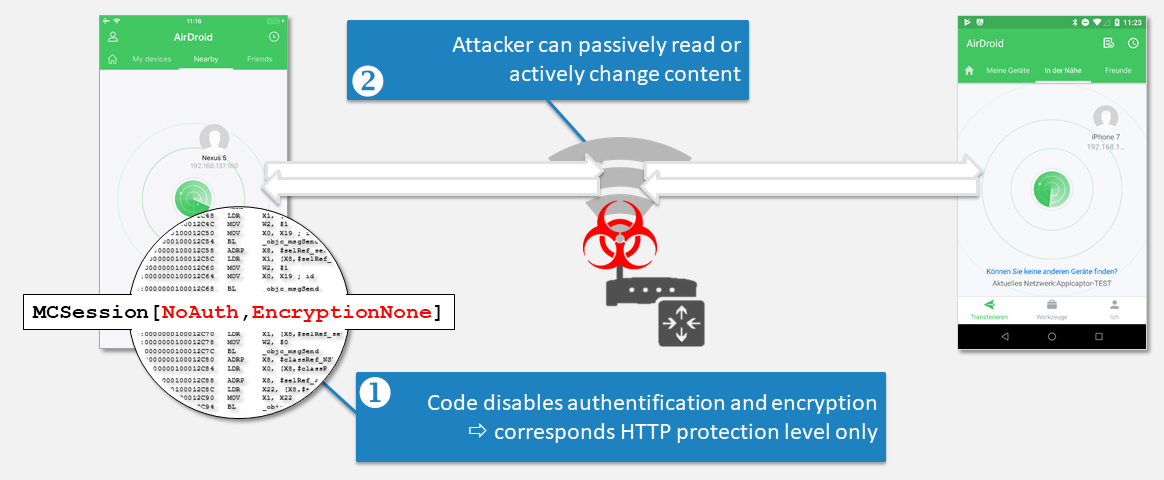
Poor / Missing cryptography: Endangerment of company data during peer-to-peer transmission due to lack of encryption and authentication. Demonstrated here with AirDroid for iOS (version 1.0.3)

The Appicaptor analyses show that 40% of the iOS Apps with this functionality neither encrypt the transmission nor authenticate the communication partners. As illustrated by the example of the AirDroid iOS App (version 1.0.3), an attacker can passively read the transmissions. For 20% of the iOS Apps with this functionality the transmission is at least encrypted, but without checking the authenticity of the communication partner. An active man-in-the-middle attack would then still be possible.

Download the complete Appicaptor Security Index 2018.